EN 03
PartyCast Mode
Set up one Flare 2 as the primary speaker and connect it with more than 100+
secondary Flare 2 speakers to control audio and all the light modes.
Set up the primary speaker:
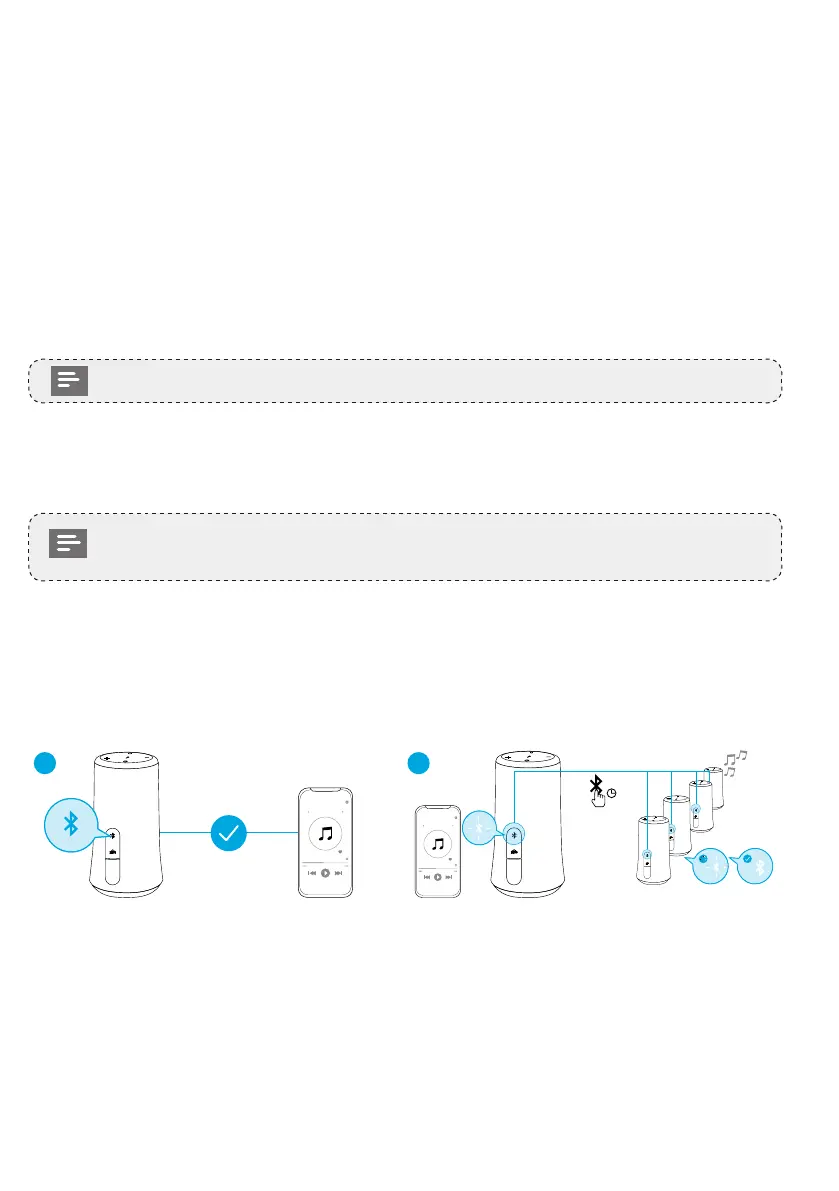
1. Connect one Flare 2 speaker to your phone or other devices via Bluetooth. When
successfully connected, the Bluetooth LED will turn blue.
2. Press and hold the Bluetooth button on this Flare 2 for 3 seconds until you hear
a sound and the Bluetooth LED ashes white to indicate this Flare 2 is the primary
speaker.
• The Bluetooth LED on the primary speaker will keep ashing white.
Connect with secondary speakers:
1. Make sure the secondary speakers aren't connected to any Bluetooth devices.
• Press the Bluetooth button to disconnect Flare 2 from a device, the
Bluetooth LED will ash blue.
2. Press the Bluetooth button for 3 seconds until you hear a sound and the Bluetooth
LED ashes white to indicate the secondary speaker is in connection mode.
3. When successfully connected, the Bluetooth LED on the primary speaker will
continue ashing white, while on the secondary speakers will turn white.
1
FLARE 2
2
FLARE 2
>3”
FLARE 2
FLARE 2
FLARE 2
FLARE 2
When PartyCast mode is successfully entered:
• You can power off, adjust the volume, or switch light modes for all speakers by
controlling the primary speaker only;
• You can power off or switch light modes for each secondary speaker individually;
• You can't adjust the volume for each secondary speaker individually;
• To exit the PartyCast mode, press the Bluetooth button on either speaker for 3
seconds until the Bluetooth LED ashes blue.








 To Next Page