04
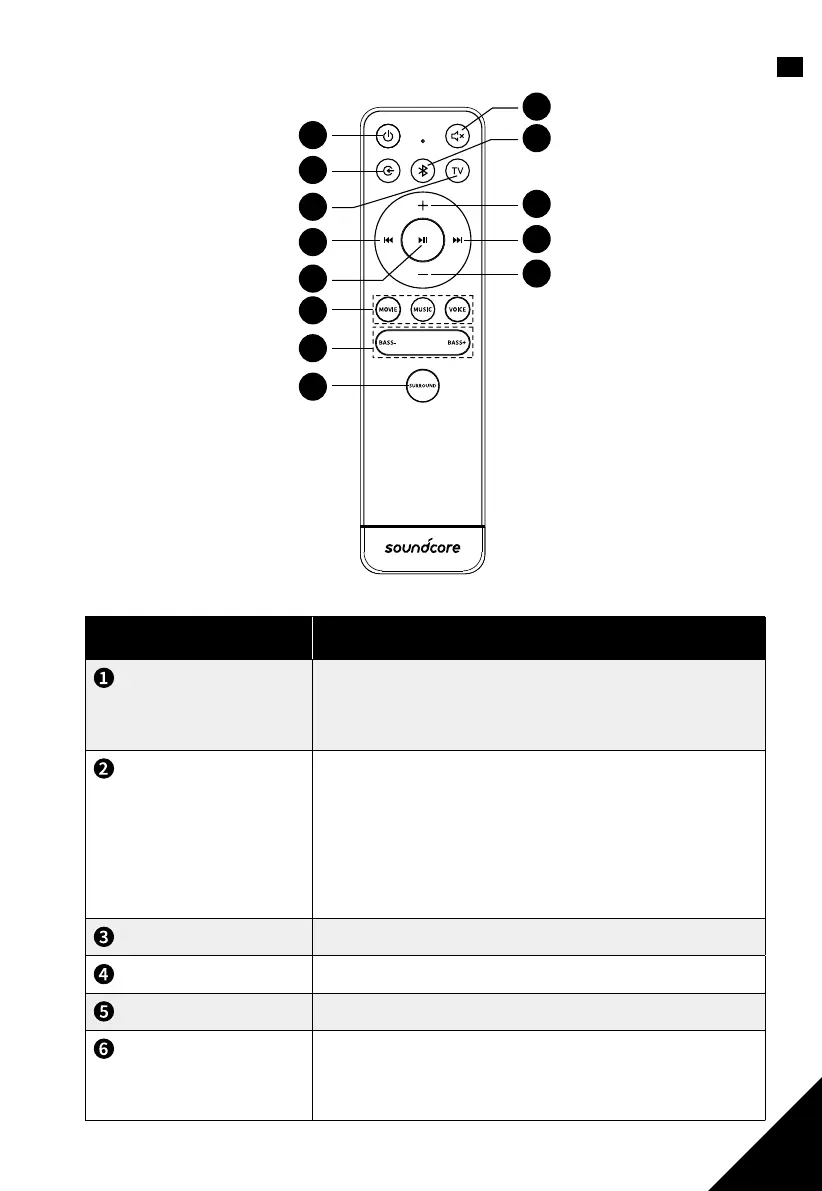
EN2. Remote control buttons
1
2
3
9
11
12
13
10
8
4
5
6
7
Button Button functions
Power button
Press to switch the soundbar on / o.
Note: the status indicator of the previously set input
source will flash when soundbar is turned on.
Source input button
Select an input source for playback:
HDMI: Sound from a device connected via HDMI IN
TV: TV audio (TV IN (OPT) and HDMI OUT (ARC)
AUX: Sound from a device connected via AUX IN
BLUETOOTH: Sound from a Bluetooth device
Refer to d. Basic Operation chapter for details.
TV button
Switch to TV source.
Previous
Return to the previous track.
Play / Pause
To pause/resume playback.
Sound mode buttons
To activate movie, music, or voice mode.
Refer to e. Sound Modes chapter for more
information.


 To Next Page