09
EN
d. Basic Operation
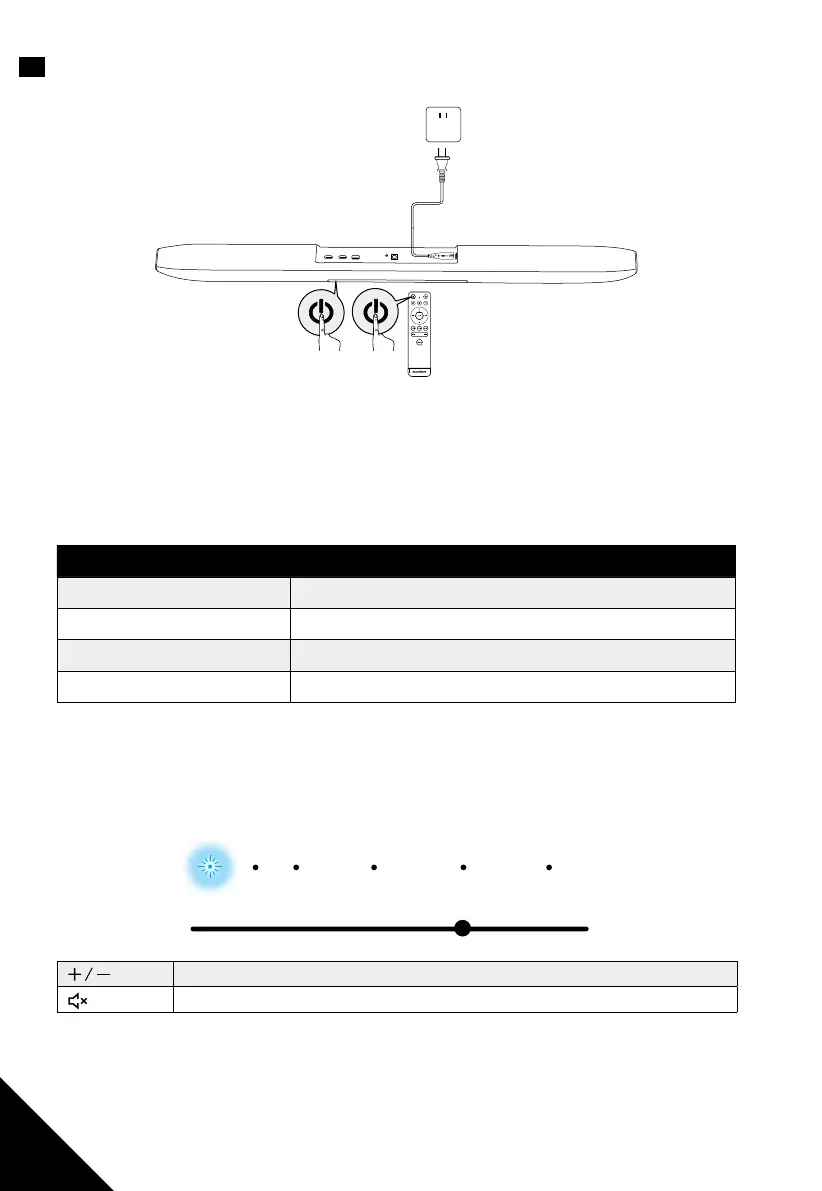
1. Press the power button on either the remote control or the soundbar to turn on
the soundbar.
2. Switch on the connected device (such as TV, playback devices, game console etc).
3. Press the source input button on either the remote control or the soundbar to
select your desired input source.
Input Source Description
HDMI Sound from a connected device (via HDMI IN port)
TV Audio from TV (via HDMI OUT port or TV IN (OPT) jack)
AUX Sound from a connected device (via AUX port)
BLUETOOTH Sound from a Bluetooth connected device
Note: The status indicator of the selected input source will flash.
Press volume buttons to control the volume of the sound. The LED indicator
indicates the level of volume.
HDMI
Volume Down (-) Volume Down (+)
TV AUX BLUETOOTH SOUND SURROUND
Volume Up / Down
Mute
Note: the volume cannot be controlled by the volume buttons on soundbar when
sound input to the HDMI IN port is output from the TV.


 To Next Page