Getting Started
Plugging-up
• Control unit with the microphone in the studio: connect the microphone to the control
unit using the multi-way cable.
• Control unit in the control room and the microphone in the studio: use the 5 x 3 pin
female XLR 's to Tuchel Male Plug splitter lead (NN2877) to connect the control unit in
the control room to the microphone lines to the studio. Use the 5 x 3 pin male XLR's to
l Tuchel Female Socket lead (NN2878) to connect the microphone to the studio
microphone lines which lead to the control unit in the control room.
DO NOT CONNECT OR DISCONNECT THE MICROPHONE TO
THE CONTROL UNIT WHEN THE UNIT IS POWERED.
TAKE CARE TO PLUG THE CORRESPONDING 3 PIN XLR's TO
THE SAME MICROPHONE LINE OR DAMAGE COULD
RESULT. THE STUDIO TIE LINES SHOULD NOT HAVE
PHANTOM POWER ON THEM.
Positioning the Microphone
The front of the microphone is marked by the SoundField logo.
Setting a Stereo Microphone Output
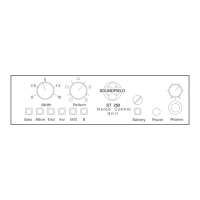
The left and right XLR-3 outputs from the control box are at line level and need to be plugged into
the line inputs of your recorder or desk and not into your mic inputs. Plug in and switch on the
SoundField Control Unit.
Ensure that the SoundField solos and osc test are off (red LEDs flash if they or the oscillator are
on).
Ensure that the dub, tape and SoundField buttons are out.
Put the fine gain at the detente and adjust the microphone gain to give just enough level to
modulate the bargraph meters around ‘0’.
The stereo outputs are now providing an output of a stereo or mono microphone with a polar
response pattern set by the left knob under the stereo microphone section and at a capsule angle
set by the right hand knob. For a crossed pair, set the pattern to cardioid (at 12 o’clock) and select
90° on the capsule angle.
Now listen to your stereo SoundField Microphone.
SoundField MKV Issue 1.1 User Guide
4



 To Next Page