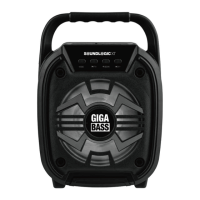
This document describes the SOUNDLOGIC XT ANC-BS949, MFSB-2/1755 SUPER-BASS Multi Function Portable BT Speaker, a versatile audio device designed for wireless music streaming and portable entertainment.
Function Description
The SOUNDLOGIC XT SUPER-BASS speaker is a multi-function portable Bluetooth speaker equipped with LED lights, offering a comprehensive audio experience. Its primary function is to deliver rich sound with enhanced bass, thanks to its built-in 2 x 4 inch speaker drivers. The speaker supports wireless audio streaming from any Bluetooth-enabled device within a range of up to 33 feet, allowing users to connect and stream music anytime, anywhere.
Beyond Bluetooth connectivity, the speaker boasts multiple input options, including a USB slot for flash drives, a Micro-SD card slot for TF cards, and an AUX jack for wired connections to various audio devices like phones, MP3 players, computers, or tablets. It also features a built-in microphone input, enabling karaoke operations or public speaking. The speaker includes an FM radio mode, allowing users to tune into their favorite radio stations. For added visual appeal, the speaker incorporates color-changing LED lights, which can be turned on or off.
The device is powered by a long-lasting rechargeable battery, ensuring extended use on the go. Charging is facilitated via a Micro USB port, and the unit is designed for portability, making it suitable for various indoor and outdoor settings, though it should not be used outdoors in wet or damp surroundings.
Usage Features
Getting Started and Charging:
Before initial use, it is recommended to fully charge the speaker for approximately 4-5 hours. The charging process involves plugging the Micro USB end of the included AUX/USB charging cable into the speaker's charging port and the other end into a USB port on a computer or a 1A USB power source. A red charging indicator on the display illuminates during charging and turns off once fully charged.
Powering On/Off:
The speaker is turned on or off using an ON/OFF SWITCH. Sliding it to the ON position activates the unit and its color-changing LED lights, while sliding it to the OFF position powers it down.
Bluetooth Pairing:
To pair a device with the speaker, first turn on the speaker and rotate the volume knob to a desired level. The LED display will show 'HIFI' followed by 'bt,' accompanied by an indication tone, signifying that the speaker is in pairing mode. Users then need to enable Bluetooth on their mobile phone, tablet, or computer. The speaker will appear as "SL SUPER-BASS" in the list of available Bluetooth devices. Selecting it and, if prompted, entering the password '0000' will establish the connection. A successful pairing is confirmed by another indication tone. If pairing fails or a new device needs to be connected, the steps can be repeated. Once paired, music can be streamed wirelessly from the source device.
Controlling Music Playback (Bluetooth, USB, SD Card Modes):
- Volume Adjustment: The speaker volume can be adjusted using the VOLUME KNOB. In Bluetooth mode, volume can also be controlled from the source device.
- Pause/Play: A short press of the PLAY/PAUSE/SCAN button pauses or resumes music playback.
- Track Navigation: Short presses of the PREVIOUS TRACK/STATION button or NEXT TRACK/STATION button allow users to skip to the previous or next track, respectively.
Listening to Music via USB / Micro SD (TF) Card Slot:
After turning on the speaker and adjusting the volume, insert a USB flash drive into the USB slot or a Micro SD (TF) card into its dedicated slot. The LED display will show 'USb' or 'tF' and music will automatically begin playing, with the display showing the track number and music time. Track navigation and pause/play functions are similar to Bluetooth mode, using the NEXT/PREVIOUS TRACK/STATION and PLAY/PAUSE/SCAN buttons.
Listening to Music via AUX-In:
With the speaker on and volume adjusted, insert the Micro USB end of the AUX/USB cable into the speaker's Aux in port and the Aux pin into the external audio device. Repeatedly short-pressing the MODE button will cycle through modes until 'LINE' is displayed, accompanied by an indication tone, signifying Aux-in mode. Music playback is then controlled directly from the connected source device, as track navigation and other functions on the speaker are not active in this mode.
Listening to FM Radio:
To access FM radio, turn on the speaker, adjust the volume, and repeatedly short-press the MODE button until an FM radio frequency with sound is displayed. To search and record all radio stations within the 87.5-108MHz frequency range, press and hold the PLAY/PAUSE/SCAN button for 2 seconds. Once stations are saved, short presses of the NEXT TRACK/STATION or PREVIOUS TRACK/STATION buttons allow users to navigate between the saved stations.
Color Changing LED Lights:
The color-changing LED lights on the front of the speaker can be turned on or off by long-pressing the LIGHT button.
Using the Microphone:
To use the microphone, turn on the speaker and insert the microphone plug (not included) into the MIC INPUT. Turn on the microphone and speak or sing for karaoke. The microphone volume can be adjusted using the VOLUME KNOB.
Maintenance Features
General Care:
The unit should be cleaned with a soft, dry cloth. Harsh chemicals or abrasive materials should never be used, as they can damage the speaker. It is crucial to keep the unit away from wet and damp surroundings to prevent damage.
Safety Precautions:
- Avoid exposing the unit to heat sources, direct sunlight, humidity, water, or any other liquids.
- Do not use the unit if it has been dropped or damaged.
- Electrical repairs should only be performed by a qualified electrician to prevent serious risk.
- Do not handle the unit with wet hands.
- Avoid inserting objects into any of the speaker's openings.
- Keep the unit free from dust and lint.
- Use the unit only for its intended purpose.
- Keep the unit out of reach of children, as it is not a toy.
- Do not play music at excessive levels to prevent hearing damage and/or equipment damage.
- Do not overcharge the speaker.
- When not in use, turn off the device to conserve battery power.
Troubleshooting Guidance:
The manual provides a troubleshooting section to address common issues:
- Low sound level: Check if the source device's volume is too low or if the battery is dead. Adjust source volume or charge the battery.
- No sound: Ensure the speaker's volume knob is not at minimum, that the connected device is playing music, and that the input source is correctly selected using the MODE button.
- Sound distortion: If sound is distorted, the volume level may be too high; decrease it using the VOLUME KNOB.
FCC Compliance:
The device complies with Part 15 of the FCC Rules, meaning it will not cause harmful interference and must accept any interference received. Users are advised that changes or modifications not expressly approved by the responsible party could void their authority to operate the product. In case of interference, users are encouraged to reorient or relocate the receiving antenna, increase separation between the product and receiver, connect the product to a different circuit, or consult a dealer/technician.
Limited Warranty:
The product comes with a limited warranty extending to the original consumer purchaser for 90 days from the purchase date, covering defective materials or workmanship. The warranty is void if damage is due to accident, misuse, neglect, improper service, or unauthorized repairs. It does not cover LCD screens, glass parts, lenses, or bulbs. The warranty is effective only if purchased and operated in the USA and Canada, and does not cover units altered or modified, or those with defaced serial numbers. For service and repair, customers should contact Midwest Trading Group Customer Service. When returning a product, it should be carefully packaged and insured, with full name, return address, phone number, a problem description, and proof of purchase.


 To Next Page
 General