TAPE OPERATION
E-6
GENERAL OPERATION
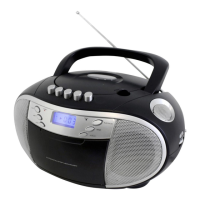
PAUSE Press to stop playing tape operation temporarily.
Press again to resume tape operation.
STOP / EJECT Press to stop tape operations.
Press again to open the cassette door after the tape spools stop turning.
FAST FORWARD & Press to start rapid tape winding either forward or reverse direction.
REWIND
PLAY Press to start playing tape.
PLAYBACK
1. Set the “FUNCTION” selector to “TAPE” mode.
2. Press the “STOP / EJECT” button to open the cassette door and insert your tape.
3. Close the cassette door.
4. Press the “PLAY” button to start playing tape.
5. Adjust the “VOLUME” control to the desired level.
6. Press the “PAUSE” button when you want to stop playing tape operation temporarily.
7. Press the “STOP / EJECT” button when finished.


 To Next Page