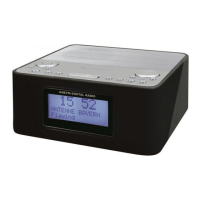
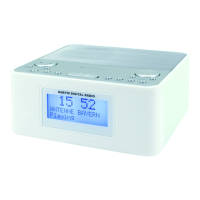
UR8800 / English Instruction Manual
2
SETTING THE CLOCK
1. In the clock is powered, press and hold the button to enter the clock setting mode.
2. Press the button repeatedly to cycle through the setting options:
Year >>> Month/Day >>> Time
Setting year: Press or button.
Setting month/day: Press the button to set the month and button to set the day.
Setting the time: Press the button to set the hour time and button to set the minute
time.
Press the button to confirm each setting option.
USING THE ALARMS
Setting alarms
The clock lets you have 2 alarm settings. To set the alarms:
1. Press and hold or button to enter the alarm time setting mode.
2. In the alarm setting mode, press the or button repeatedly to cycle through the setting
options:
Alarm time >>> Alarm frequency
Setting alarm time:
Press button to set the hour time and button to set the minute time.
Setting alarm frequency:
Press or button to select an alarm frequency (d1-7 = Everyday d1-5 = Monday to Friday,
d6-7 = Weekend only, d1-1 = on a selected day only*).
*Press or button when this option is selected. Then press the “ or to select a
specific day for the alarm activation (e.g. d1 = Monday, d2 = Tuesday…).
Once the alarm setting is done, the alarm will be automatically activated with the corresponding
alarm indicator (1 or 2) switched on.
Turning the alarms on or off
When the clock time is displayed, press or button to enable or disable the respective
alarm. The corresponding Alarm 1 or Alarm 2 indicator will switch on when the alarm is enabled.
Deactivating a sounding alarm
Press or button to switch off a sounding alarm.
When the alarm sounds, the corresponding Alarm 1 or Alarm 2 indicator flashes on the
display.
Snooze
To temporarily silence a sounding alarm, press the “SNOOZE” button. The alarm will sound
again when the snooze period (9 minutes) is over.
The corresponding Alarm 1 or Alarm 2 indicator flashes on the display during the snooze
period.
To cancel the snooze period and the alarm, press or button.


 To Next Page