EasyManua.ls Logo

SoundMax SM-CCR3052F - User Manual

SoundMax SM-CCR3052F
28 pages
Print Icon
To Next Page IconTo Next Page
Loading...
SM-CCR3052F
USB/SD media player USB/SD-медиаплеер
Instruction manual Руководство по эксплуатации
Question and Answer IconNeed help?

Do you have a question about the SoundMax SM-CCR3052F and is the answer not in the manual?

Overview

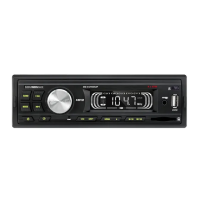
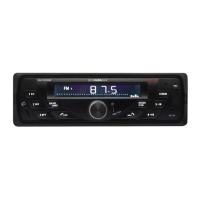
The SOUNDMAX SM-CCR3052F is a car media player designed to provide audio entertainment and connectivity in a vehicle. It functions as a stereo FM radio, USB/SD media player, and offers an AUX input for external audio devices.

Function Description

The SM-CCR3052F serves as a versatile audio system for your car. Its primary functions include:

  • FM Stereo Radio: Allows you to tune into FM radio stations across three bands (FM1, FM2, FM3). It supports both manual and automatic tuning, as well as storing and recalling preset stations.
  • USB/SD Media Player: Enables playback of audio files from USB flash drives and SD memory cards. It supports USB 2.0 and memory cards up to 16 GB, with FAT/FAT32 file systems. Playback features include next/previous track selection, fast forward/rewind, play/pause, repeat (RPT), and random (RDM) playback. It also allows skipping tracks by 10 (forward or backward).
  • AUX Input: Provides a 3.5mm jack for connecting external audio equipment, such as MP3 players, to amplify their sound through the car's acoustic system.
  • Audio Parameter Setting: Offers control over various audio parameters including Bass (BAS), Treble (TRE), Balance (BAL), Fader (FAD), Loudness (LOUD), and Equalizer (EQ).

Important Technical Specifications

  • General:
    • Maximum power output: 4 x 45 W
    • Required speaker impedance: 4 Ohm
    • Fuse: 5 A
    • Unit dimensions: 178 x 50 x 97 mm
    • Net weight: 0.36 kg
  • FM Stereo Radio:
    • Frequency range: 87.5 - 108.0 MHz
    • Preset stations: 18
    • Stereo separation: >25 dB
  • Player:
    • Supported storages: USB/SD (up to 16 GB, FAT/FAT32 file systems)
  • Line Out:
    • Stereo RCA output (2 V)

Usage Features

The device is designed for user-friendly operation with a clear front panel layout.

Basic Operations:

  • Power On/Off: Press the U button to turn the unit on or off.
  • Reset: A RESET button (located in a small hole) allows you to restore factory settings, which is recommended after initial installation or battery replacement. This will erase clock settings and memorized functions.
  • Mode Selection: The MODE button cycles through Radio, AUX, and MP3 modes. MP3 mode is only available when a USB or SD device is connected.
  • Volume Control: A rotary VOLUME knob adjusts the sound level.
  • Clock Display/Setting: Press the U button to display the time. Press and hold it to enter clock setting mode, then rotate the VOLUME knob to adjust.

Audio Adjustments:

  • Audio Parameters: Repeatedly pressing the VOLUME knob cycles through BAS, TRE, BAL, and FAD settings. Press and hold the knob to select LOUD or EQ.
    • Bass/Treble: Adjustable from -7 to +7.
    • Balance: Adjustable from -10 (left) to +10 (right).
    • Fader: Adjustable from -10 (rear) to +10 (front).
    • Loudness: Enhances bass and treble at low volumes.
    • Equalizer: Offers POP, CLASS, ROCK, or OFF modes. Bass and treble are not adjustable when an EQ mode other than OFF is active.

Radio Operations:

  • Band Selection: The BAND button cycles through FM1, FM2, and FM3.
  • Tuning:
    • Short press of K or M buttons: Automatic search for the next strong signal.
    • Press and hold K or M buttons: Manual tuning mode. Repeatedly press K or M for step-by-step frequency adjustment.
  • Storing/Recalling Stations:
    • Press and hold BAND: Automatically finds and stores the 6 strongest stations in the current band to preset buttons (1-6).
    • Press preset buttons (1-6): Selects saved channels. To save a new station, select the desired preset number, tune to the new frequency, then press and hold the preset button.

USB/SD Operations:

  • Inserting/Removing Media: Carefully insert SD cards into the front slot until a click, then pull to remove. Connect USB drives to the front USB jack. Playback starts automatically.
  • Track Navigation: Use K or M buttons for next/previous track. Press and hold for fast forward/rewind.
  • Play/Pause: The PLAY/PAUSE button toggles playback.
  • Repeat: The RPT button repeats the current track. Press again to cancel.
  • Random: The RDM button plays tracks in random order. Press again to cancel.
  • Skipping Tracks: -10 and +10 buttons skip tracks by 10.

Maintenance Features

  • Cleaning: The unit body should be wiped with a soft cloth. For heavy dirt, dampen the cloth with a weak soapy solution, then wipe clean with a dry cloth.
  • Troubleshooting Guide: A comprehensive guide is provided to help resolve common issues such as no power, no sound, or radio malfunction. This includes checking wiring, fuses, volume levels, antenna connection, and signal strength. If issues persist, it is recommended to contact a service center or dealer.

Important Safeguards:

  • Read the manual carefully before use.
  • Allow the device to warm up to operating temperature in cold weather.
  • Disconnect the vehicle's negative battery terminal during installation.
  • Use fuses with identical amperage ratings.
  • Avoid exposing the unit to water, moisture, dust, or extreme temperatures.
  • Do not open or repair the unit yourself; consult a qualified technician.
  • Disconnect power and antenna if not using for extended periods or during thunderstorms.
  • Ensure proper power supply and disconnect if the unit malfunctions or emits unusual sounds/smells.
  • Confirm the unit is designed for negative battery terminal connection to vehicle metal.
  • Prevent speaker wires from shorting to avoid overloading or burning out the power amplifier.

SoundMax SM-CCR3052F Specifications

General IconGeneral
BrandSoundMax
ModelSM-CCR3052F
CategoryCar Receiver
LanguageEnglish