Need help?
Do you have a question about the soundsation GO-SOUND AIR and is the answer not in the manual?
Guide to unpacking the speaker and performing initial setup steps.
Highlights the main features and design aspects of the GO-SOUND Air series.
Explanation of safety symbols and crucial general operating instructions.
Precautions for water exposure, moisture, and proximity to heat sources.
Safety procedures for ventilation, power supply, and cleaning.
Guidelines for servicing and safe electrical connections.
Critical warning regarding potential hearing damage from high sound pressure.
Guide to unpacking the speaker and initial placement for optimal performance.
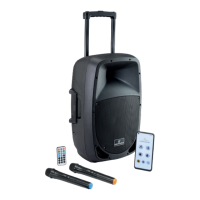
Overview of the GO-SOUND Air series, including app control capabilities.
Comprehensive list of the main features and specifications of the GO-SOUND Air series.
Instructions for connecting the speaker to the AC mains power supply.
How to use a 12VDC power source, including polarity and cable specifications.
Connecting external audio devices via RCA and 1/4" jack inputs.
Introduction to the connectors, controls, and indicators located on the rear panel.
Explanation of controls for the integrated digital media player.
Adjusting microphone and line input levels, and echo effect.
Information on the 5-band graphic equalizer and master volume.
How antennas work and guidelines for 12VDC power input.
Explanation of the VHF receiver's operation and LED indicators.
How to adjust the signal levels for microphone and line inputs.
Adjusting echo, media player volume, and overall master volume.
Understanding the mix output and clip indicator LED.
How to use the 5-band graphic equalizer for sound customization.
Methods for checking the speaker's internal battery charge status.
Introduction to the Go-Sound Air application for mobile devices.
Explanation of the media player's LCD display and control buttons.
How to use playback controls, repeat modes, and skip functions.
Instructions for playing audio files from USB drives and SD-cards.
Step-by-step guide for pairing Bluetooth devices with the speaker.
How to connect your mobile device via Bluetooth for audio streaming.
Explanation of the functions and operation of the included remote control.
How to download and set up the Go-Sound Air app for iOS and Android.
Instructions for downloading the Go-Sound Air app from app stores.
Overview of the app's home page, buttons, and control functions.
Step-by-step guide for establishing dual Bluetooth connections for audio streaming and app control.
Navigating and controlling playback from different media sources.
Understanding playback modes, status, and quick volume adjustments.
How to activate or mute the auxiliary audio input on the speaker.
Adjusting master volume, bass, and treble for the media player.
Using graphic EQ presets and creating custom user equalizer curves.
Details on microphone parts, LED indicator, and on/off switch.
Important notes on microphone usage, mute function, and battery installation.
Information on the internal 12V-7Ah rechargeable battery powering the system.
Detailed step-by-step instructions for replacing the internal battery.
Technical details on battery dimensions and electrical characteristics.
How to charge the battery, interpret LED indicators, and charging time.
Information on battery duration and how to identify a low charge state.
Guidelines for safe handling, storage, and disposal of batteries.
List of critical warnings against misuse, damage, or improper disposal of batteries.
Detailed technical specifications for the GO-SOUND 12Air model.
Detailed technical specifications for the GO-SOUND 15Air model.
Details on the limited two-year warranty and what is not covered.
Guidelines for obtaining service and returning defective products.
Information on proper disposal of the product according to WEEE regulations.
 General
| Brand | Soundsation |
|---|---|
| Model | GO-SOUND AIR |
| Bluetooth | Yes |
| Enclosure Material | Plastic |
| Inputs | AUX |
| Battery | Built-in rechargeable |
| Connectivity | Bluetooth |
| Input | AUX |

 To Next Page