EasyManua.ls Logo

Southern Telecom colorways CW788 - User Manual

Southern Telecom colorways CW788
8 pages
Print Icon
To Next Page IconTo Next Page
Loading...
User Guide
CW788
Desktop
Diffuser
Question and Answer IconNeed help?

Do you have a question about the Southern Telecom colorways CW788 and is the answer not in the manual?

Summary

Before You Begin

Questions & Support

Information on where to find support for questions or problems concerning the product.

In the Box

Lists the items included in the product packaging, such as the diffuser, cable, and manual.

Caution

Important safety instructions and usage guidelines, including operation time and oil type.

Getting Started

Location of Controls

Identifies the key components of the diffuser, such as the cover, oil cup, light bulb, and power port.

Setting Up

Instructions on how to set up the diffuser by adding essential oil and replacing the cover.

Connecting to Power

Using the Diffuser & Lights

Cleaning the Diffuser

Storing the Diffuser

Precautions & Warnings

Compliance Information

FCC Information

Details on the device's compliance with FCC rules and regulations regarding radio frequency interference.

Radiation Exposure Information

Information regarding the device's evaluation to meet general RF exposure requirements.

Rating Label Definitions

Explanation of rating labels, including the FCC Declaration of Conformity symbol.

Warranty Information

90-Day Limited Warranty

Details of the 90-day limited warranty for the product in the United States and Canada.

LIMITED WARRANTY TO ORIGINAL CONSUMER

Explains the warranty coverage provided by Southern Telecom, Inc. for defects in materials and workmanship.

To obtain warranty service

Steps to follow to obtain warranty service, including visiting the support portal and submitting a request.

Warranty service not provided

Outlines the conditions and damages that are not covered by the product's warranty.

Overview

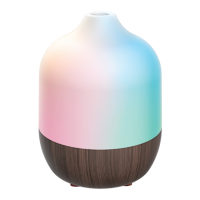
This document describes the Colorways Desktop Diffuser (Model CW788), a device designed to disperse essential oils into the air, enhancing the ambiance of a room.

Function Description:

The Colorways Desktop Diffuser is an oil cup diffuser that uses essential oils (not included) to create an aromatic environment. It features LED lights that cycle through different colors when connected to power, adding a visual element to its function. The device is intended for use in indoor spaces, with a suggested room size of approximately 100 ft². It operates by adding 1-2 drops of essential oil to an oil cup, which then diffuses the aroma.

Important Technical Specifications:

  • Model Number: CW788
  • Power Source: Micro-USB Power Cable (included). Requires a compatible 5V/1A USB adapter (not included) if plugging into a wall socket, or can be connected to a USB port on a computer.
  • Aroma Operation Time: Up to 5 hours
  • Suggested Room Size: ~100 ft² (may vary based on environmental factors and oil type)
  • Oil Type: Only 100% natural essential oil should be used. Oils containing chemical fragrance, spice, or other impurities may cause malfunctions.

Usage Features:

  • Simple Setup: To set up, pull up the cover to remove it, add 1-2 drops of essential oil to the oil cup, and then replace the cover.
  • Automatic Operation: The diffuser and its LED lights automatically power ON when connected to power and power OFF when disconnected. The LED lights cycle through different colors.
  • Controls: The device has an oil cup, a light bulb (LED), and a power port for connection.
  • Portability: The device is designed for desktop use and is powered via USB, offering flexibility in placement. It is evaluated to meet general RF exposure requirements and can be used in portable exposure conditions without restriction.

Maintenance Features:

  • Cleaning: The diffuser should be unplugged and allowed to cool completely before cleaning. Wipe the diffuser with a dry or damp towel or cloth, and allow it to dry completely. It is crucial not to submerge the unit in water or use concentrated chemicals for cleaning.
  • Storage: When not in use for a long period, the diffuser should be stored in a dry, cool location, away from sources of water or heat. It is recommended to cover the diffuser to protect it from dust. For extended storage, it's best to keep it in an airtight box or bag (not included) away from heat, sunshine, and moisture.
  • Oil Cup Maintenance: Always pour any remaining oil out of the oil cup and wipe it with a clean, dry cloth. Do not overfill the oil cup.
  • Regular Cleaning: Clean the diffuser regularly according to the instructions to prevent malfunctions.

Precautions and Warnings:

  • Safety: Do not turn the diffuser on when the oil cup is empty. Do not touch the inside of the oil cup when the diffuser is powered on.
  • Power: Always unplug the power adapter and allow to cool off completely before maintenance. Only use the supplied power cable. If using a USB adapter, it must be a 5V/1A USB adapter.
  • Placement: Do not place the diffuser directly near furniture, clothing, art, or any valuable objects as essential oils can stain. Keep away from direct sunlight, heat sources, air conditioners, and fans. Always keep on a stable, flat surface; do not place on a carpet, bed, cushion, or other non-flat, non-stable surface. Keep away from electronic equipment.
  • Usage Limits: Do not use for more than 5 hours at a time. Never move the product while in use.
  • Handling: Do not touch any part of the product with wet hands. Do not tip the product as it may cause oil to enter the mechanism and cause malfunction.
  • Environmental Conditions: Do not expose the unit to extreme temperatures (heat or cold), open flames, humid conditions, or wet conditions. Do not submerge in water.
  • Children and Pets: Keep out of reach of children and pets. Children should not be left unsupervised near this product. This unit is not to be used by children or any person(s) with reduced physical, sensory, or mental capabilities, or lack of experience and knowledge, unless they have been given express supervision and instruction.
  • Power Cable: Keep the power cable clear of pathways and do not forcefully pull or remove it from the unit.
  • Malfunction: Do not open this product or attempt to repair the unit yourself should it not be working. If smoke or a burning smell is detected, immediately unplug the unit.

Warranty Information:

The product comes with a 90-Day Limited Warranty for the United States/Canada, covering defects in materials and workmanship. Warranty service can be obtained by visiting www.customersupport123.com, selecting the brand and model, and filling out a service request form. Exchanges require dated proof of purchase from an authorized retailer. The warranty does not cover damage from accident, misuse, abuse, improper installation or operation, lack of reasonable care, or unauthorized modification. It is voided if any unauthorized person opens, alters, or repairs the product. The warranty explicitly disclaims implied warranties of merchantability or fitness for a particular purpose beyond the express warranty period. Repair, replacement, or refund of the original purchase price are the exclusive remedies. The distributor is not liable for incidental, direct, indirect, special, punitive, or consequential damages. The warranty is non-transferable and applies only to the original consumer purchaser.

Southern Telecom colorways CW788 Specifications

General IconGeneral
BrandSouthern Telecom
Modelcolorways CW788
CategoryAccessories
LanguageEnglish

Related product manuals