EasyManua.ls Logo

Southwire SURGE GUARD 40300 - User Manual

Southwire SURGE GUARD 40300
2 pages
Print Icon
To Next Page IconTo Next Page
Loading...
For technical assistance, please call 1-800-780-4324 x 20311
Manufactured by Southwire Company, LLC, 5250 140th Avenue North, Clearwater, Florida 33760
© 2017 Southwire Company, LLC. All rights reserved. * Trademark of Southwire Company, LLC. Registered in the United States.
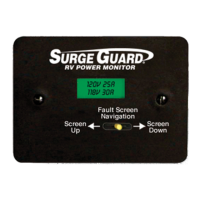
For use with Surge Guard* Hardwire units, the optional Remote Power Monitor LCD Display is connected to a
Surge Guard unit via an RJ12 (6 pin) connector cable and remotely monitors your electrical power anywhere
inside your RV.
This display allows you to see more detailed information such as voltages for Line 1 and Line 2 (typically 110-
120VAC), current draws, and status/conditions of the Surge Guard Hardwire unit. Electrical faults such as low
voltage or an open ground connection that cause the Surge Guard Hardwire to shut off power are shown on the
remote display, allowing you to retrieve via the joystick a log of the fault conditions.
The Remote Display is a helpful diagnostic tool that allows you to comprehend and correct problems with your
RV's power. The display also features an up/down navigation button/lever allowing navigation through various
informational screens.
Features and information displayed includes
the following:
Main Screen: The Main Screen of the Display
is used to show a continuous status of the RV’s
electrical power. These include: incoming line
voltages and currents (Amps) being used by the RV;
reverse polarity state, which is a faulty shore power
condition; delay state, which is a waiting state that
the Surge Guard device goes into when it is powered
up or when there is a fault with shore power. The
display will revert back to the Main Screen by default
if it is left in any other screen for more than 3 minutes.
L1/L2 Volt and Current Screens: Displays
Line 1/2 voltage or current. This allows you to view
the voltage or current when there is a fault condition
being displayed on the Main Screen.
Faults Screen: Allows you to view a history of up
to 50 faults which have been logged by the hardwire
unit. Each fault that has been logged contains the
fault, the voltages and currents at the time of the
fault, and the time and date when it occurred.
Joystick Lever: to navigate through screens and
set the time and date.
Navigation
Fault Screen
Up
Screen
Down
Screen
R
MADE IN
HONDURAS
505-00127B
INSTALLATION & OPERATING
INSTRUCTIONS
Model 40300
Optional Hardwire Remote Power Monitor LCD Display
with Navigation
Question and Answer IconNeed help?

Do you have a question about the Southwire SURGE GUARD 40300 and is the answer not in the manual?

Summary

Optional Hardwire Remote Power Monitor LCD Display

Main Screen

Shows continuous status of RV electrical power, including incoming voltages and currents.

L1;L2 Volt and Current Screens

Displays Line 1/2 voltage or current, useful when a fault condition is displayed.

Faults Screen

Allows viewing history of up to 50 logged faults with details like time and date.

Joystick Lever

Used to navigate through screens and set the time and date.

Installation and Operation Instructions

Fault Code Indicators Reference

Reference for fault codes displayed by the Surge Guard unit, detailing voltage and connection issues.

Screen Navigation

How to select different information screens using the lever on the display unit.

Display During Fault Conditions

Shows faults on LCD with a 3-second interval between each detected fault.

L1 VOLT | L2 VOLT Screens

Useful for viewing line voltages during delay or fault conditions, with a wider range.

L1 CURR | L2 CURR Screens

Useful for viewing line currents in amps during delay or fault conditions.

View Faults Screen

Allows viewing recorded faults by pushing the lever down or in.

Summary

Optional Hardwire Remote Power Monitor LCD Display

Main Screen

Shows continuous status of RV electrical power, including incoming voltages and currents.

L1;L2 Volt and Current Screens

Displays Line 1/2 voltage or current, useful when a fault condition is displayed.

Faults Screen

Allows viewing history of up to 50 logged faults with details like time and date.

Joystick Lever

Used to navigate through screens and set the time and date.

Installation and Operation Instructions

Fault Code Indicators Reference

Reference for fault codes displayed by the Surge Guard unit, detailing voltage and connection issues.

Screen Navigation

How to select different information screens using the lever on the display unit.

Display During Fault Conditions

Shows faults on LCD with a 3-second interval between each detected fault.

L1 VOLT | L2 VOLT Screens

Useful for viewing line voltages during delay or fault conditions, with a wider range.

L1 CURR | L2 CURR Screens

Useful for viewing line currents in amps during delay or fault conditions.

View Faults Screen

Allows viewing recorded faults by pushing the lever down or in.

Overview

The Southwire™ SURGE GUARD® RV Power Protection Model 40300 is an optional hardwire remote power monitor LCD display with navigation, designed for use with Surge Guard® Hardwire units. This device allows RV owners to remotely monitor their electrical power from anywhere inside their RV, providing detailed information about the electrical system and any potential faults.

Function Description:

The primary function of the Model 40300 is to provide a continuous visual indication of the RV's electrical power status, including source voltages, load currents, and fault diagnostics. It connects to a Surge Guard Hardwire unit via an RJ12 (6 pin) connector cable. The display serves as a helpful diagnostic tool, enabling users to understand and correct problems with their RV's power system. It features an up/down navigation button/lever for easy navigation through various informational screens and a joystick lever for further interaction, such as setting the time and date or viewing fault logs.

Important Technical Specifications:

  • Connectivity: RJ12 (6 pin) connector cable for connection to Surge Guard Hardwire units.
  • Display Type: LCD Display.
  • Dimensions (Approximate):
    • Overall Height: 3.50 inches
    • Overall Width: 4.70 inches
    • Depth (from mounting surface to front of joystick shaft): 1.40 inches
    • Joystick Shaft Length (Yellow): 0.47 inches
    • RJ12 Connector Length: 3.64 inches
  • Fault Log Capacity: Stores a history of up to 50 faults.
  • Voltage Monitoring Range (L1/L2 Volt Screens): 90 to 140 Volts (Main Screen displays 102-132V, otherwise indicates a fault).
  • Current Monitoring: Displays Line 1 and Line 2 current in Amps.
  • Compatibility: Designed for use with Surge Guard Hardwire units. For 30A Surge Guard devices, L2 VOLT and L2 CURR screens are not applicable.

Usage Features:

The Model 40300 offers several screens and features for comprehensive power monitoring:

  • Main Screen: This screen provides a continuous status of the RV's electrical power. It displays incoming line voltages and currents (Amps), reverse polarity state (a faulty shore power condition), and delay state (a waiting state during power-up or after a fault). The display automatically reverts to the Main Screen after 3 minutes of inactivity on other screens.
  • L1/L2 Volt and Current Screens: These dedicated screens allow users to view Line 1 and Line 2 voltage or current. This is particularly useful for monitoring these parameters when a fault condition is displayed on the Main Screen. The L2 VOLT and L2 CURR screens are only shown when using a 50Amp Surge Guard device.
  • Faults Screen: This feature allows users to view a detailed history of up to 50 logged faults. Each fault entry includes the specific fault, the voltages and currents at the time of the fault, and the exact time and date it occurred. Navigation through the fault log is done using the joystick lever.
  • Screen Navigation: The joystick lever on the front of the unit facilitates navigation. Pushing the lever to the RIGHT repeatedly cycles through screens in one direction, while pushing to the LEFT cycles in reverse. Pushing the lever DOWN/IN from the "VIEW FAULTS" screen accesses the fault log.
  • Display for Normal Operation: During normal operation, the display continuously shows voltages and currents for power Lines 1 and 2 on the main screen.
  • Display During Fault Conditions: If any electrical faults or problems occur, the display will show the specific faults on the LCD screen, cycling through each item at 3-second intervals. Fault codes are detailed in the "FAULT CODE INDICATORS" section of the manual.
  • Display During Delay State: When the Surge Guard unit powers up, the display shows "Delay" and a countdown in seconds until the 128-second delay is complete. After the delay, if shore power is good, the unit connects power to the RV and returns to the normal operating screen.
  • Joystick Lever: Used for navigating through screens, viewing fault logs, and setting the time and date.

Fault Code Indicators:

The display provides specific fault codes to indicate various electrical issues:

  • REPLACE SURGE: Surge Protection Expended.
  • L1 LO: Line 1 voltage is low (below 102 VAC).
  • L1 HI: Line 1 voltage is high (above 132 VAC).
  • L2 LO: Line 2 voltage is low (below 102 VAC).
  • L2 HI: Line 2 voltage is high (above 132 VAC).
  • REV POL: Reverse polarity condition (hot wire and neutral are swapped).
  • L1 OPEN: Line 1 connection missing or mis-wired.
  • L2 OPEN: Line 2 connection missing or mis-wired.
  • DELAY: Delay mode waiting for power to come back on.
  • OPEN GND: Open ground fault condition (ground wire missing or mis-wired).
  • NEUTRIP CUR-65A: Current > 130%.

Installation and Maintenance Features:

  • Installation Flexibility: The RJ12 (6 pin) connector cable allows for installation virtually anywhere inside the RV, or even in the same location as the Surge Guard unit. Mounting is not strictly necessary, but a suggested procedure is provided for secure installation.
  • Mounting Procedure: Involves removing the cover plate, marking an outline using the open box as a template, allowing room for the connector cable, positioning the box, securing it with mounting screws (not supplied), and reattaching the cover plate.
  • Cable Management: Excess cable length can be bundled with a plastic tie wrap.
  • Environmental Considerations: Cable ends and the remote display must be located in a dry interior location, away from inclement weather and moisture.
  • Connection Timing: The Remote Display can be connected to the Surge Guard device either before or after the Surge Guard device has been powered up.
  • Technical Support: For technical assistance, users can contact Southwire Company, LLC at 1-800-780-4324 x 20311.

This device is manufactured by Southwire Company, LLC, located at 5250 140th Avenue North, Clearwater, Florida 33760. It is a trademark of Southwire Company, LLC, registered in the United States.
Southwire SURGE GUARD 40300 Specifications

General IconGeneral
BrandSouthwire
ModelSURGE GUARD 40300
CategoryMonitor
LanguageEnglish

Related product manuals