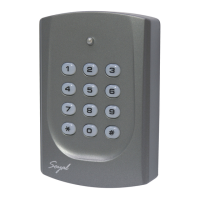
Soyal AR721HV3 hardware operation manual
Revision: V1
Date released: 1 Nov 2006
UM_SoyalAR721HV3V1
Table of Contents
Page
1 Introduction --------------------------------------------------------------------------- 2
2 Features --------------------------------------------------------------------------- 2
3 Specification -------------------------------------------------------------------------- 3
4 Installation Notice ------------------------------------------------------------------------- 4
5 Front Panel Indicators ---------------------------------------------------------------------- 7
6 Access Mode ------------------------------------------------------------------------- 8
User can select one of the following access modes ---------------------------- 8
AR-721HV3/1356 -------------------------------------------------------------------- 8
Duress function -------------------------------------------------------------------- 9
Force on/off Code (4 sets, 4 digits) ---------------------------------------------- 9
7 Function Default Value ---------------------------------------------------------------------- 11
8 Wiring ---------------------------------------------------------------------- 13
9 Installation Diagram ----------------------------------------------------------------------- 14
10 Installation --------------------------------------------------------------- -------25
11 Troubleshooting --------------------------------------------------------------- ------- 25
12 Return of Products --------------------------------------------------------- -------------25
13 Warranty -------------------------------------------------------- ---------------26
※ Removable CPU ------------------------------------------------------------ ---------- - 26
14 Mode 4 Easy Guide --------------------------------------------------------------- ---------27
15 Mode 8 Easy Guide ---------------------------------------------------------------- ---------31
16 Mode 6 Easy Guide ---------------------------------------------------------------- ---------32
17 Mode 7 Easy Guide ----------------------------------------------------------------- --------34
18 Special Design ------------------------------------------------------------------ --------36
19 Transponder Record Table --------------------------------------------------------- ------- 39
19.1 For AR-721H4, AR-721H7 and AR-721H8 ------------------------------------ 39
19.2 For AR-721H6 ------------------------------------------------------------------ ------- 40
20 FAQ ------------------------------------------------------------------------ 41
1. INTRODUCTION
Getting to know your SOYAL Proximity Reader….
The AR-721HV3 & AR-721HV1356 are smart single door controller. It built-in a 6” RF
reader and an external reader port for exit or anti-pass-back use. It can work standalone
including 1000 cardholders with anti-pass-back function. Or connect with multi-door
networking controller to provide 15,000 cardholders with multi door anti-pass-back
access control. About networking of AR-721H series. Once the network communication
stop over 10 seconds on the RS-485 port. It will auto enter standalone control mode .
Notice:
The reader of AR-721HV2 owns the same functions as AR-721HV3 except for Calendar
& Time system supporting and 1,200 Transaction Buffer features.
Copyright © 2004 Soyal Technology Co. Ltd.
All Rights Reserved.
2. Features
Calendar & Time system supporting.
Providing proximity card flash edit mode
for easy & quick setting.
Two Sets of Auto-Open Zone Function.
Built-in opened door relay, alarm relay
and request to exit button input.
Up to 1,200 Transaction Buffer.
Master Card Range assignable.
Run as a standalone controller during
Host controller failure.
Support Auto-relock Function.
Universal serial port supported for LED display, printer, Lift controller, etc.
Intergrades any brand, any frequency of Wiegand reader with soyal or other access
control systems.
Keypad will be locked for 30 seconds while continuous error operation.
Press [*] + [#] to lock / unlock keypad immediately.
Built-in watchdog to prevent the system from halting.
Door unlock time setting, latched-on/latched-off or momentary 0.1-600 seconds.
Alarm function is available (temper, force entrance, door open too long, duress).
12 numeric keypad, 1 bicolor LED (green and red) and buzzer indicator.
3. Specification
Mode Description:
Access Mode A: Card only, Card + PIN, PIN + Code
Access Mode B: Card only, PWD only, Card + PWD
Access Mode C: Card Only, Card + PIN, PIN only
How to get the Mode Status
Step 1. Press
*
+ 1 2 3 4 5 6 + # enter the FUNCTION MENU
Step 2. You will hear the “Beep”sound from the
machine , as follows:
M4: Sound with 4 times
M6: Sound with 6 times
M8: Sound with 8 times
MODE M4 M6 M8
Card Holder 1024 65536 1024
Card Code 32 bits 16 bits 32 bits
Lift Control 32 * 32
Anti-Pass-back 1024 * 1024
Connect to 716EV2 Y * Y
PC Y * Y
Access Mode A B C
Transaction Buffer 1200 * 1200
How to change the Mode Status
Step 1. Press
# + 1 2 3 4 5 6 + # enter the FUNCTION MENU
Step 2. Editing Mode
M4:press 0 4 * 4 # and hearing
Beep Sound with 4 times
M6: press 0 4 * 6 # and hearing
Beep Sound with 6 times
M8: press 0 4 * 8 # and hearing
Beep Sound with 8 times


 To Next Page
 Need help?
 General