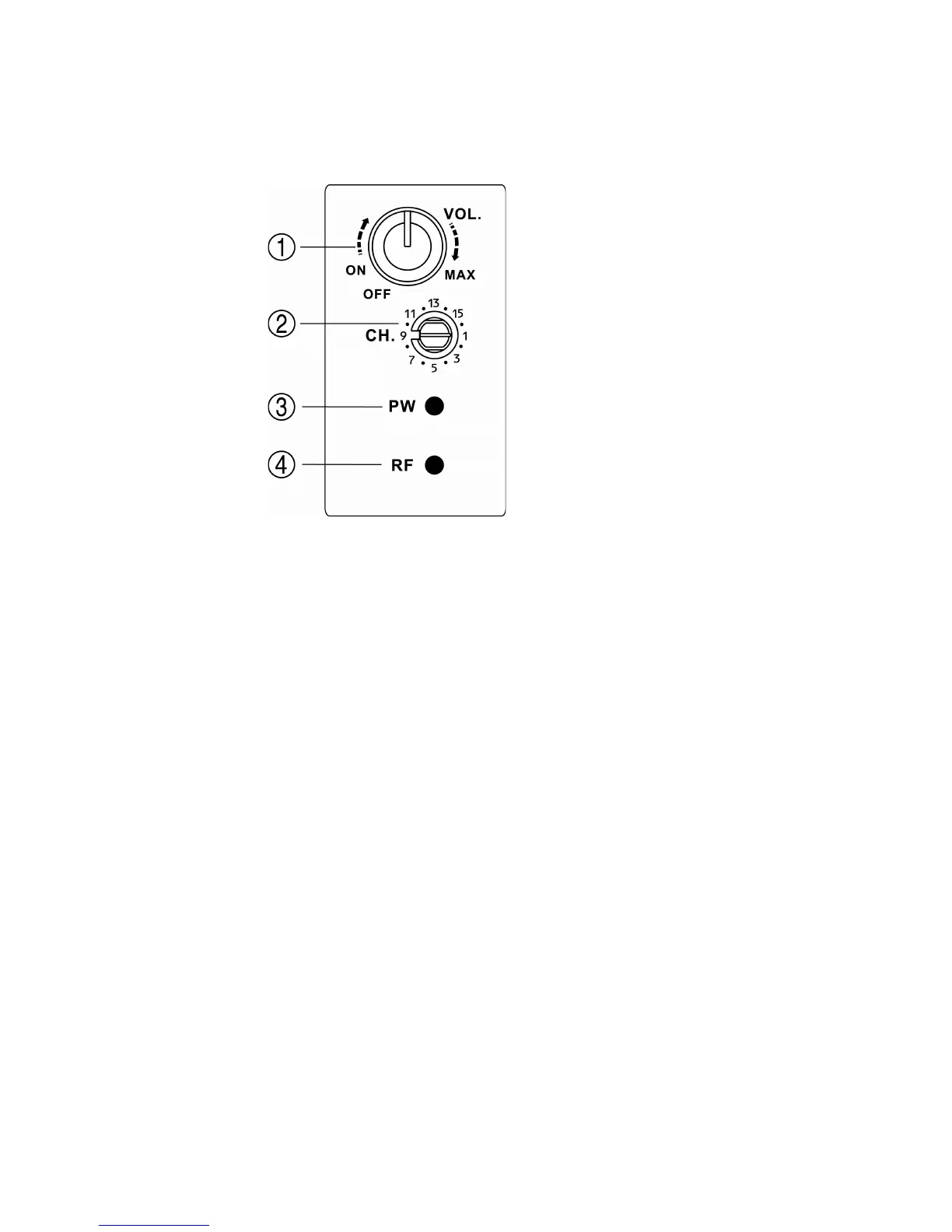
B) Wireless Receiver: 16 frequency UHF wireless system.
1) On/Off/Volume Control: Independent volume control for the USB input. Clockwise
turn increases volume. Leave in the OFF position if not used. PW LED below
indicates power on or off.
2) Wireless Channel Selector: With Evo True Wireless transmitter turned OFF, select
a channel on the Group.X Evo Lite that shows no RF present, as indicated by the
RF LED below.
3) Power Status LED: Indicates power status as determined by the On/Off control
above.
4) RF Indicator: LED will light in the presence of RF (wireless signal) on the selected
channel. After selecting a channel as described in (2) above, and setting the Evo
transmitter to the same channel as described in Section 7.2, this LED should remain
on, indicating that the unit is receiving the signal from the headset transmitter.
C) External Microphone Input: ¼ inch input for use with a dynamic microphone. Volume is
controlled by the Main Volume control (G).
D) Aux Input: 1/8 inch (3.5 mm) input for connecting a variety of audio sources (MP3, CD,
tape, etc.). Volume is controlled by the Main Volume control (G).


 To Next Page