5
GE2POTS1 POTS2 RESET GE1 GE3 GE4 POWER
VDSL BROADBAND
To get a VDSL connection, a technician will rst install a VDSL splitter and a VDSL
jack point (RJ45). Your home phone remains connected to its current jack point.
Download Spark Broadband Assist to
your computer, a free tool to help set
up and manage your modem and your
Yahoo! Mail. See page 6 for more info
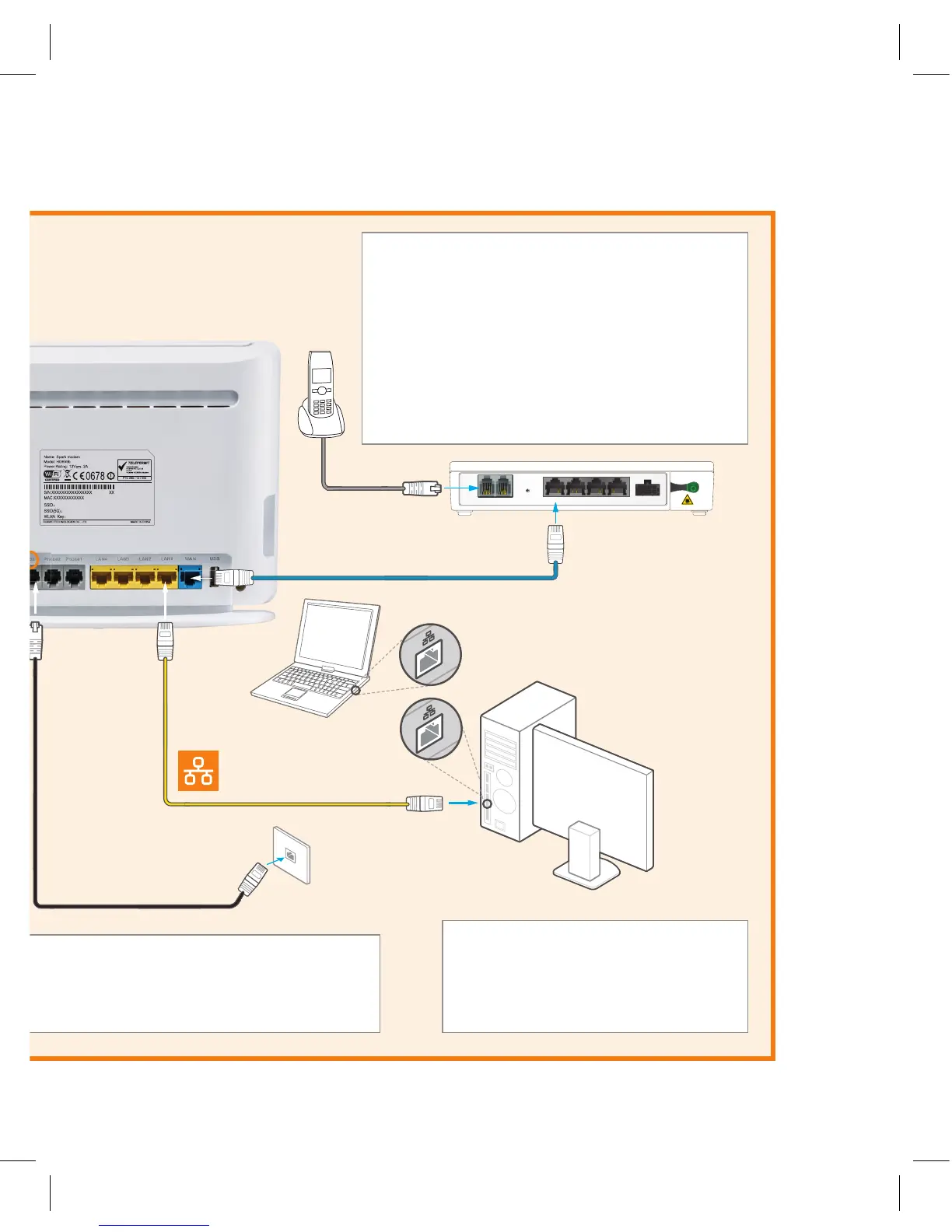
FIBRE BROADBAND
Fibre Landline
If you have Fibre Landline with integrated wiring
(your phone jack points have been connected to
the ONT), you can plug your home phone into
your phone jack points.
If you have Fibre Landline without integrated
wiring, you can connect your home phone to
POTS1 port on the ONT for voice services.
Fibre (blue)
Most Fibre providers
use port GE1, but
check with yours.
ADSL (grey)
VDSL (black)
VDSL
jack point
Small
connector
(RJ11)
First, connect it all together using the coloured cable for your broadband connection type: ADSL (grey), VDSL (black) or
Fibre (blue). Then, wait 5 minutes for all the connections to be established. You can read the next pages while you wait.
Look for this symbol
on your computer.
LAN
Ethernet
(yellow)
GE2POTS1 POTS2 RESET GE1 GE3 GE4 POWER
GE2POTS1 POTS2 RESET GE1 GE3 GE4 POWER
GE2POTS1 POTS2 RESET GE1 GE3 GE4 POWER
Large
connector
(RJ45)
SPARK-ABC123
SPARK-ABC123-5G
a1b2c3d4
SPA0959 HG659b QSG v1.indd 5 29/05/15 9:20 am


 To Next Page