EasyManua.ls Logo

Sparkfun Electronics AD8232 - User Manual

Sparkfun Electronics AD8232
15 pages
Print Icon
To Next Page IconTo Next Page
Loading...
AD8232 Heart Rate Monitor Hookup Guide a
learn.sparkfun.com tutorial
Available online at: http://sfe.io/t250
Contents
Introduction
Understanding the ECG
Connecting the Hardware
Uploading the Sketch and Connecting with Processing
Tips and Tricks
Resources and Going Further
Introduction
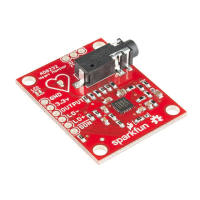
The AD8232 is a neat little chip used to measure the electrical activity of the heart. This electrical
activity can be charted as an ECG or Electrocardiogram. Electrocardiography is used to help
diagnose various heart conditions. Now for the disclaimer:
NOTE: This device is not intended to diagnose or treat any conditions.
Page 1 of 15
Question and Answer IconNeed help?

Do you have a question about the Sparkfun Electronics AD8232 and is the answer not in the manual?

Sparkfun Electronics AD8232 Specifications

General IconGeneral
BrandSparkfun Electronics
ModelAD8232
CategoryHeart Rate Monitor
LanguageEnglish

Summary

Introduction to AD8232 Heart Rate Monitor

Understanding the ECG Signal

PR Interval Explained

Describes the initial wave generated by an electrical impulse traveling from the right atrium to the left.

QT Interval Explained

Explains the complex process generating the signature "beep" in cardiac monitors during ventricular contraction.

AD8232 Hardware Connection Guide

Required Materials and Components

Lists the necessary components like USB cable, jumper wires, and breadboard for setup.

Pin Connections and Wiring

Details the nine connections on the AD8232 board and how to connect them to an Arduino.

Connecting Headers to the Board

Explains how to solder header pins to the AD8232 board for easier connection.

Connection Diagram and Sensor Placement

Provides a visual diagram for wiring the AD8232 to an Arduino and shows sensor placement on the body.

Software Setup and Data Visualization

Arduino Sketch Upload and Configuration

Guides on uploading the demo sketch to the Arduino and setting up serial communication.

Processing Sketch for Data Display

Details how to run the Processing sketch for visualizing ECG data and configuring the COM port.

Improving ECG Signal Quality

Additional Resources and Next Steps