Page 7
How to Install Cable
in Model 81
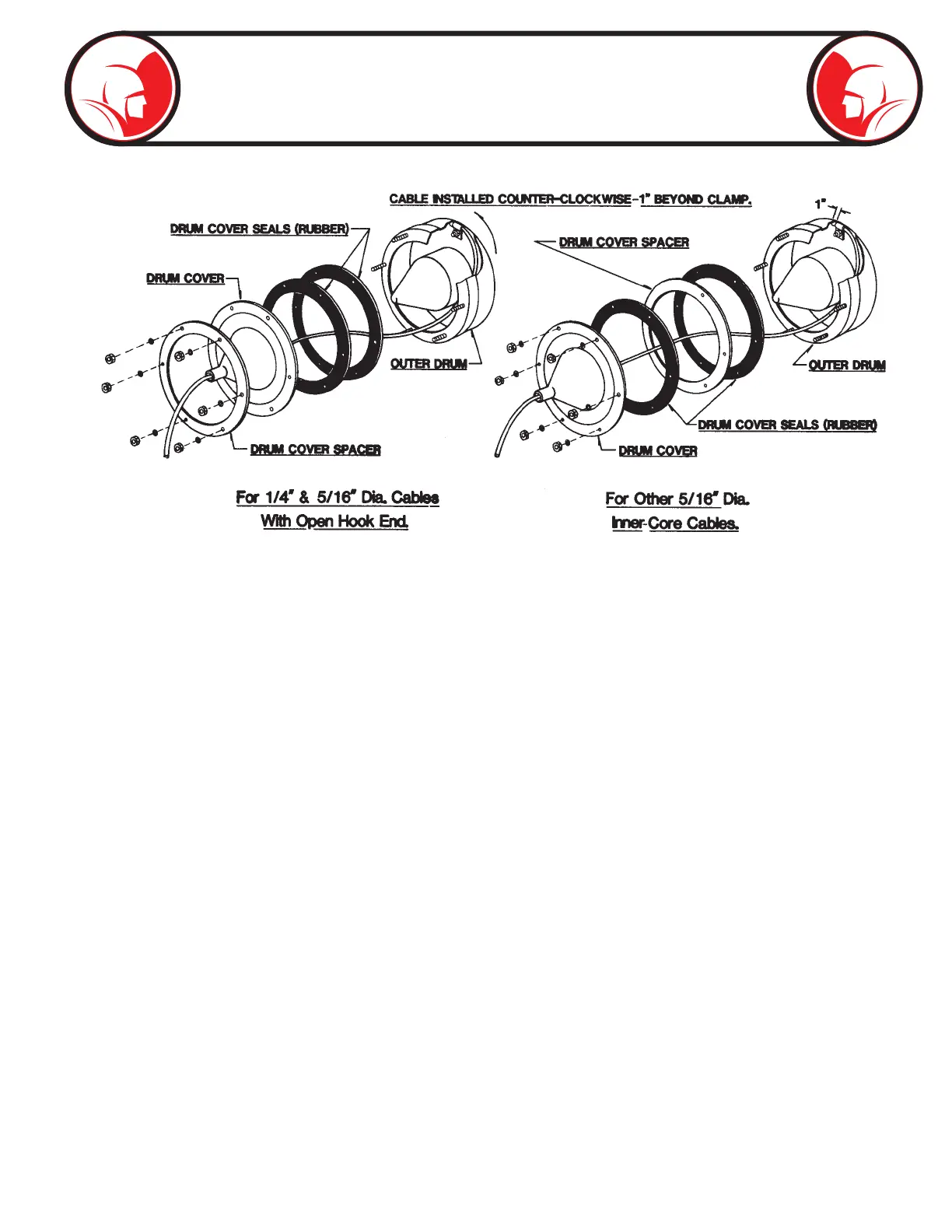
1. Position drum unit in a vertical position. Remove (6) nuts, washers, drum cover, drum cover spacer,
and (2) drum cover seals.
2. Assemble drum cover spacer and (2) seals to outer drum as required for various cables. See Figure
1 and Figure 2.
3. Insert cable through drum cover as illustrated in Figure 1.
4. Place end of cable in outer drum. Slide cable under clamp. Cable should enter clamp in counterclockwise
direction and extend approximately 1” beyond clamp. See Figure 1. tighten clamp screw.
5. Place drum cover on outer drum assembly and secure with (6) nuts and washers. Assemble all (6)
nuts, tightening all nuts a little at a time; about 3 times around. Then give nuts a nal tightening.
6. Feed remainder of cable into drum while drum is operating in forward only.
Fig 1 Fig 2


 To Next Page