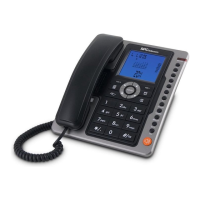
SETTING MENU
SETTING DATE AND TIME
1. In on-hook state, press [MENU] key, LCD displays SET 1 DATE
2. Press [MENU] key, the digits of year flash.
3. Press ▲ or ▼ key to edit the year, Press [MENU] key to confirm, use the same method
to set the month, date, hour and minute.
SETTING LOCAL AREA CODE
1. At on-hook state, press [MENU] key and then press ▲ key, LCD will display SET 2
CODE
2. Press [MENU] key again, LCD displays CODE - - - - - -
3. Press ▲ or ▼ key to set the first digit of local area code;
4. Press [MENU] key to confirm and enter the second digit setting, use the same method
to set the rest 5 digits.
SETTING LONG DISTANCE CODE
1. At on hook state, press [MENU] key
2. Press ▲ key 2 times, LCD displays SET 3 LCODE.
3. Press [MENU] to confirm, LCD displays ---------------0
4. Press ▲ or ▼ key to set the first code, Press [MENU] key to confirm to enter the next
one.
SETTING LCD CONTRAST
1 At on hook state, press [MENU] key
2 Press ▲ key three times, LCD displays SET 4 LCD
3 Press [MENU] to confirm, LCD displays LCD 5
4 Press ▲ or ▼ key to select the comfortable level among 8 levels
5 Press [MENU] to confirm.
SETTING FLASH TIME
1. At on hook state, press [MENU] key
2. Press ▲ key four times, LCD displays SET 5 FLASH
3. Press [MENU] to confirm, LCD displays FLASH 100
4. Press ▲ or ▼ key to select the required flash time from FLASH 100, FLASH 300,
FLASH 600, FLASH 1000
5. Press [MENU] to confirm.
REDIAL FUNCTION
Pick up the handset or press key, then press key. The first 32-digit of last
dialled number will be dialled out.


 To Next Page