CALLER ID
When the telephone is receiving an incoming call, the incoming call number is displayed
on LCD. The missed call numbers will always displaying until you pick-up and hang-up
one time.
VOLUME CONTROL
Ringing volume control
Slide the TIMBRE switch to select the ringing volume for incoming calls.
1. If you slide the TIMBRE switch to , the ringing volume is loud,
2. If you slide the TIMBRE switch to , the ringing volume is low,
3. If you slide the TIMBRE switch to , it will not ring when there is a new call coming.
Handset volume booster function
1. At handset conversation mode, if you feel the handset volume to low, press once
to increase the volume about 10 dB to help you to lesson clearly.
2. Press key again or pick up the handset next time, the handset volume is return to
primary state.
Adjust hands-free volume
At hands-free state, press ▲ or ▼ key to adjust hands-free volume, total 4 levels can be
adjusted.
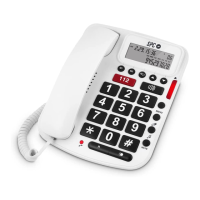
1 PROGRAMMABLE 112 NUMBER
Emergency Service
1. At on-hook or off-hook state, press 112 key.
2. The emergency call number 112 is dialled out.
Store 112 numbers
The emergency number can be changed.
1. Input the first 112 number not exceeding 32 digits.
2. Press key, LCD displays “STORE”, then press 112 key.
TROUBLE SHOOTING
? No receiving
+ Check if the handset is on the phone or line is broken.
? Noise
+ Check if the circuit is broken, change the circuit.
Check if the connector is moist or rust, change the connector.
? Ring once then disconnect when receive a call. Dialing function is available
+ Check if connector is in a moist environment.
Check if too many extensions are used together or the quality of extension is not good
enough, change the bad extension.


 To Next Page