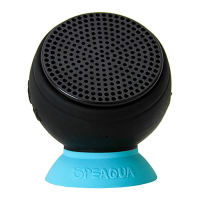
The Speaqua Barnacle PRO is a 100% waterproof speaker designed for robust outdoor performance and versatile use. It offers a range of features for playing music, handling calls, and adapting to various environments, including underwater.
Function Description:
The Barnacle PRO is primarily a portable speaker that can play music from two main sources: Bluetooth and its internal memory. It is built to be completely waterproof and dustproof, with an IP68 rating, meaning it can be submerged in water up to 1 meter (3.3 feet) for up to 60 minutes. This makes it suitable for use in, around, and under water without the need for a connected smart device.
When operating in Bluetooth mode, the speaker connects wirelessly to a smart device (phone, tablet, or computer) and streams audio from it. The Bluetooth range is approximately 10 meters (33 feet). The speaker also functions as a speakerphone, allowing users to answer or reject incoming calls and conduct hands-free conversations.
In Memory Mode, the Barnacle PRO plays music directly from its internal storage, eliminating the need for a connected device. This feature is particularly useful for underwater listening or when a phone is not desired or safe to use. Music files can be loaded onto the speaker's "Barnacle P" folder via a micro USB connection to a computer.
The device supports Dual Pairing, allowing two Barnacle PRO speakers to connect wirelessly and play music simultaneously, creating a more immersive audio experience.
Usage Features:
The Barnacle PRO features intuitive button controls for various functions:
- Power/Memory Mode Button: A long press (3s) turns the speaker on or off. A single tap while powered on switches between Bluetooth Mode (indicated by a blue light) and Memory Mode (indicated by a green light). In Memory Mode, a double tap shuffles the music (indicated by a violet light).
- Volume Up (+): A tap increases the volume, while holding it continuously increases the volume.
- Volume Down (-): A tap decreases the volume, and holding it continuously decreases the volume.
- Previous Song (<): A tap selects the previous song.
- Play/Pause (>): A tap plays or pauses music. A long press (3s) connects or disconnects Bluetooth mode. For phone calls, a tap picks up or hangs up an incoming call, while a long press (2s) rejects an incoming call or returns to music.
- Next Song (>): A tap selects the next song. This button is also used for Dual Pairing; a long press (3s) on the primary speaker initiates dual pairing mode (indicated by a fast blinking blue light).
Mounting Options:
The speaker offers universal mounting versatility:
- Built-in Carabiner: A metal hanger provides convenient on-the-go attachment and hanging options.
- 1/4" Threaded Screw: A 1/4" thread allows the speaker to be secured to any universal camera mount, offering tool-free attachment.
- Removable Suction Cup: This allows the speaker to be stuck to smooth surfaces.
- GoPro® Mount Adapter: An adapter is included for compatibility with GoPro® mounts.
Bluetooth Connectivity:
To connect via Bluetooth:
- Power on the Barnacle PRO; a blinking blue light indicates it's ready to connect.
- Search for "Barnacle P" in your device's Bluetooth settings and connect.
- Once paired, the speaker and device will automatically connect as long as Bluetooth is on.
- To disconnect Bluetooth, hold the play/pause button for a couple of seconds until a sound notification confirms disconnection.
Downloading Music to Internal Memory:
- Power on the Barnacle PRO.
- Connect the micro USB data cable from the speaker's charging port to your computer's USB port.
- A folder named "Barnacle P" will appear. Drag and drop music files into this folder. Songs will play in the order they are added.
- To remove songs, drag them from the "Barnacle P" folder to your computer's trash bin and empty the bin before ejecting.
- Safely eject the USB from the computer.
Wireless Dual Pairing:
- Ensure both PRO speakers are powered on and close to each other. Designate one as the primary speaker (Speaker A).
- Connect Speaker A to your smart device via Bluetooth.
- Ensure the second speaker (Speaker B) is in Bluetooth pairing mode (blinking blue light).
- Press and hold the "Next" button on Speaker A for 3 seconds to enter dual pairing mode (fast blinking blue light).
- A sound notification will confirm successful pairing of both speakers (may take up to 30 seconds).
While Paired:
- Turning off Speaker A will automatically turn off Speaker B.
- Turning off Speaker B will allow Speaker A to continue playing.
- To disconnect Speaker B, hold down the "Play/Pause" button on Speaker B to exit pairing mode and return to Bluetooth mode.
Speakerphone Functionality:
- When a call comes in, music will pause.
- Tap the Play/Pause button to answer or hang up a call.
- Hold the Play/Pause button for 2 seconds to ignore a call.
- Music resumes after hanging up or dismissing a call.
Maintenance Features:
- Charging: The speaker is rechargeable via the included USB charging cord. It can be plugged into a wall outlet (using a micro USB power cord or USB AC adapter, like a cell phone charger) or a computer. A blinking red light indicates charging, and a solid red light means it's fully charged. A blinking red light also indicates when the battery level is less than 15%.
- Waterproof/Dustproof: The IP68 rating means the speaker is fully dustproof and can withstand full water immersion up to 1 meter for 60 minutes.
- Cleaning: The speaker is designed to be easy to clean. After exposure to sand, mud, snow, or ocean water, it can be wiped clean with fresh water and a soft towel.
- Charging Port Flap: Ensure the flap covering the charging port is always securely closed when using the speaker in water to maintain its waterproof integrity.
- Safe Ejection: When connecting to a computer for music transfer, always safely eject the USB device to prevent data corruption.
Safety Guidelines:
- Avoid placing the speaker very close to ears, especially for young children, to prevent potential damage to eardrums.
- Keep the speaker away from young children as it is not a toy.
- Keep the speaker clear from heated surfaces.
- Use the product only for its intended purposes as described in the manual.
- Do not operate the product if there is any damage to the cord, plug, or housing.
Speaqua also promotes an Electronic Recycling Initiative, encouraging users to return damaged or unwanted speakers for proper disposal and offering a 20% discount on their next purchase.

 Need help?
 General

 To Next Page