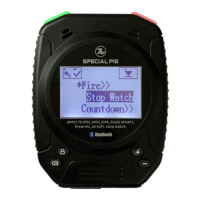
This document describes the M1A2 Series Shot Timer, a device designed for firearm and airsoft shooting sports, including IPSC, APSC, IDPA, and 3-Gun competitions. The series includes two models: the M1A2-F (Standard Firearm Shot Timer) and the M1A2-FW (Wireless Firearm Shot Timer). The M1A2-FW model offers additional functionality, including wireless connectivity to a wireless LED display. Both models come with a shot timer, a USB cable, and a user guide.
Function Description
The M1A2 Series Shot Timer is a versatile device used for timing shooting events. It can operate in various modes, including:
- Firearm Mode: For timing live fire or airsoft shooting.
- Stopwatch Mode: For general timing purposes.
- Countdown Mode: For setting a specific countdown duration.
The timer records shot times and split times, providing detailed feedback for shooters. It also supports a "Par Mode" for setting target times and cycles, allowing shooters to practice specific drills. The device can store historical data/scores, which can be reviewed on the timer itself or, for the M1A2-FW, potentially integrated with external displays.
Important Technical Specifications
While specific technical specifications like battery capacity or display resolution are not explicitly detailed, the manual provides information on charging and connectivity:
- Charging: The device charges via a DC5V power adapter or power bank using a USB charging port. A red LED indicates charging, and a blue LED indicates a full charge. Full charging takes approximately 1.5 hours.
- Bluetooth (M1A2-FW): The M1A2-FW model features Bluetooth connectivity, indicated by a Bluetooth icon on the display. This allows for wireless connection to a wireless LED display and compatibility with the PractiScore APP on Android devices. Each timer has a unique Bluetooth code for identification.
- Sensitivity Levels: The timer offers 8 levels of sensitivity for sound picking, with Level 8 being the most sensitive and Level 1 the least.
- Countdown Duration: The countdown mode supports a maximum duration of 600 seconds.
Usage Features
The M1A2 Shot Timer offers a range of user-friendly features:
Power On/Off:
- Hold the "Power" button for 5 seconds to power the device on or off.
Setting Modes:
- Timing Mode: Hold the "Power" button to enter the set menu and select between Firearm, Stop Watch, or Countdown modes.
- Delay Mode: In non-timing status, hold the "Power" button to enter the set menu, then navigate to "Delay." Choose from "Instant," "Random" (3-5 seconds), or "Fixed" (customizable up to 10 seconds) delay modes by holding down the desired option.
- Par Mode: In non-timing status, hold the "Power" button to enter the set menu, then navigate to "Par." Set the desired time and cycles. To start/close Par Mode, hold the "+" button.
Shortcut Keys:
- Sensitivity Adjustment: Hold the "Lock" button for 2 seconds to enter the setting interface. Quick press the "Speaker" button to adjust beep tone/volume, and quick press the "+" or "-" buttons to adjust sound picking sensitivity (Levels 1-8). Sensitivity can also be adjusted in the firearm mode within the setting menu.
- Beep Tone/Volume Adjustment: Hold the "Lock" button to enter the sensitivity and volume adjusting interface. Quick press the "Speaker" button to cycle through 3 volume classes.
- Countdown Mode Activation: Hold the "-" button for 3 seconds to start countdown mode (max 600 seconds).
- Par Mode Start/Close: Hold the "+" button to start or close Par Mode.
Reviewing History Data/Scores:
- Shot Time/Split Time: In non-timing status, quick press the "Power" button to review shot time and split time for every shot.
- Group Shooter Scores: Hold the "Speaker" button for 2 seconds to check/delete group shooter scores. Quick press the "Start" button to view specific shooters/group scores. Quick press the "Power" button to view the current shooter/group's shot times/scores.
- Exiting Group Data Checking: Hold the "Speaker" button for 2 seconds, then quick press "Power" or "Start" to exit the group data checking interface.
Eco Mode and Language Settings:
- Eco Mode: In non-timing status, hold the "Power" button to enter the set menu, then navigate to "System" -> "Eco Mode." Quick press the "Power" button to switch to "Customized" and hold the "Start" button to select it.
- Language: In non-timing status, hold the "Power" button to enter the set menu, then navigate to "System" -> "Language." Quick press to switch language options (e.g., Chinese, English) and hold the "Start" button to select.
Bluetooth Connection (M1A2-FW):
- The default Bluetooth setting is "on."
- To connect to the PractiScore APP (Android only): Download the app, input shooter and stage info, then choose "enter score" -> "stage" -> "shooter." Click the top right 3 dots, select "timer," and choose your timer from the popup list using its unique Bluetooth code.
- Once connected, start timing by holding the "Start" button on the timer or tapping the red clock icon in the app. Quick press the "Power" button to stop timing.
Physical Design:
- The device features a hanging hook for attachment and screw holes for fixing a belt clip.
Maintenance Features
- Charging Indicator: Red LED for charging, blue LED for fully charged.
- Low Battery Warning: The timer screen may appear upside down when the battery is low, indicating it needs to be charged.
- Warranty: Special Pie offers a 12-month free warranty for the product, with charges for man-made malfunctions.
The device also includes an "Icon Explanation" section in the manual, detailing the meaning of various icons displayed on the timer, such as Firearms Mode, Airsoft Mode, Stopwatch Mode, Battery Level, Wirelessly Connected, and Bluetooth on. It also explains icons for menu navigation (Return, Scroll down, Select, Mode selected, Sub-Menu available, Cancel) and actions required to activate icons (Quick press Start button, Quick press Review button, Hold down Start button (2 secs), Hold down Review button (2 secs)).

 Need help?
 General

 To Next Page