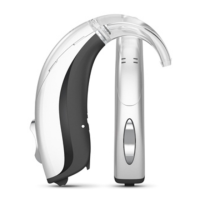
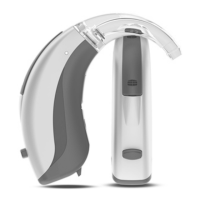
This document provides user instructions for the Advance 52 series A52-FS model hearing aids, which are Receiver-in-canal (RIC) or Receiver-in-the-ear (RITE) devices.
Function Description:
The Advance 52 series A52-FS hearing aids are air conduction amplification devices designed for everyday listening environments. They are intended for individuals with hearing loss ranging from minimal (10 dB HL) to severe-to-profound (100 dB HL) across all hearing loss configurations. These devices are programmed by licensed hearing care professionals, including audiologists, hearing aid specialists, and otolaryngologists.
A key feature is the optional Zen program, which provides a relaxing sound background (music/noise source) for adults who desire such a background in quiet environments. The hearing aids can be equipped with an Audibility Extender feature, which can be activated by a hearing care professional depending on the user's hearing loss.
The hearing aids offer various listening programs to adapt to different sound environments:
- Universal: For everyday use.
- Quiet: A special program for listening in quiet environments.
- Transport: For listening in situations with noise from cars, trains, etc.
- Urban: For listening in situations with changing sound levels (e.g., supermarkets, noisy workplaces).
- Party: For listening in situations with many people talking simultaneously.
- Music: Specifically designed for listening to music.
- T (Telecoil): Allows listening directly through the hearing aid's telecoil to sound without background noise (requires a teleloop system).
- M+T (Microphone + Telecoil): A combination program where the user listens to the sound source via the telecoil but can also hear other sounds through the microphone.
- Zen: Plays musical tones or noise for a relaxing sound background.
- Phone: Designed for listening to phone conversations.
The hearing aids also include SmartToggle programs:
- Zen+: Similar to Zen but offers different types of tones or noise.
- Phone+: Allows listening to the phone while avoiding surrounding sounds, with one hearing aid transmitting the conversation to the other for binaural listening.
The push button on the hearing aid can be configured in several ways:
- Dedicated program button: A short tap changes programs. A push and hold (optional) accesses and exits SmartToggle programs, with subsequent short taps changing Zen styles.
- Dedicated sound adjustment button: A tap on the right hearing aid increases audibility/volume, while a tap on the left hearing aid decreases volume/increases comfort. A long push on either hearing aid (optional) mutes and unmutes the sound.
- Combined program and sound adjustment button: A tap on the right hearing aid increases audibility/volume, and a tap on the left hearing aid decreases volume/increases comfort. A long push on either hearing aid changes programs. For single hearing aid users, a short tap changes programs, and a long tap accesses SmartToggle programs.
- Hearing aids and batteries can be dangerous if swallowed or used improperly; contact emergency services if ingested.
- Remove hearing aids when not in use to ventilate the ear canal and prevent infections.
- Contact a professional if an ear infection, allergic reaction, discomfort, or improper fit occurs.
- Remove hearing aids before showering, swimming, or using a hair dryer.
- Do not wear hearing aids when applying perfume, spray, gels, lotion, or cream.
- Do not dry hearing aids in a microwave oven.
- Do not share hearing aids.
- Avoid using hearing aids in environments with explosive gases.
- Keep hearing aids, parts, accessories, and batteries away from children and mentally disabled people.
- Do not attempt to open or repair the hearing aid yourself.
- Hearing aids contain radio communication technology; observe environmental restrictions.
- The hearing aid is powerful and can produce sounds exceeding 132 dB, posing a risk of damaging remaining hearing.
- Avoid extreme temperatures or high humidity; dry quickly if wet.
- Never attempt to recharge zinc-air batteries.
- Do not leave flat batteries in hearing aids during storage.
- Dispose of used batteries as indicated on packaging.
Important Technical Specifications:
- Battery Type: Type 312 zinc-air battery.
- Operating Temperature Range: 0°C (32°F) to 50°C (122°F).
- Storage and Transport Temperature Range: -20°C (-4°F) to +55°C (131°F).
- Storage and Transport Humidity Range: 10%-95% rH.
- Radio Transmitter: Operates at 10.6 MHz, -54 dBμA/m @10 m.
- Maximum Sound Output: Can exceed 132 dB.
Usage Features:
- On/Off Switch: Located on the hearing aid.
- Battery Drawer: Features a nail grip for easy opening and closing. A tamper-resistant battery drawer is available for children aged three or younger.
- Program Button: Used for changing programs and adjusting sound, depending on configuration.
- Right/Left Identification: The hearing aid for the right ear has a red mark; the left ear has a blue mark.
- Low Battery Indication: A sound signal plays when the battery is flat, though sudden drainage may occur without warning.
- Lost Partner Feature (top models only): Warns the user if the hearing aid loses contact with the device in the opposite ear via a spoken message.
- Phone Usage: When using a phone, hold it at an angle above the ear, not directly against it.
Maintenance Features:
- Daily Cleaning: Recommended for efficiency and comfort.
- Cleaning Tools Provided:
- Cloth
- Brush
- Long wax-removing tool
- Short wax-removing tool
- Battery magnet
- Cleaning Procedure:
- Wipe the hearing aid with a soft cloth.
- If microphone openings are blocked, contact a hearing care professional.
- Dry the hearing aid quickly if it gets wet or exposed to heavy perspiration.
- Consider using a special dehumidifier (e.g., Widex Dry-Go) for drying and cleaning.
- Leave the battery compartment open to ventilate the hearing aid.
- Do not use any liquid or disinfectant to clean the hearing aid.
- Inspect the hearing aid daily for damage; if it breaks in the ear canal, contact a doctor and do not attempt to remove fragments yourself.
Troubleshooting:
The manual provides a troubleshooting guide for common issues such as:
- Hearing aid completely silent (check if turned on, battery drawer closed, or battery dead).
- Hearing aid volume not powerful enough (check for earwax blockage or changes in hearing).
- Hearing aid whistling continuously (check for earwax blockage).
- Two hearing aids not working in synchrony (turn them off and on again).
- Hearing aids not responding to control device (check device range, electromagnetic interference, or device matching).
- Interrupted speech or no speech from transmitting hearing aid (check battery or electromagnetic interference).
- EC Directives: Complies with Directive 2014/53/EU.
- Disposal: Do not dispose of hearing aids, accessories, or batteries with ordinary household waste. Dispose of them at designated sites for waste electrical and electronic equipment or return them to a hearing care professional for safe disposal.
- Symbols: The manual includes a list of symbols used in medical device labeling, such as Manufacturer, Catalogue number, Consult instructions for use, Warning, WEEE mark, CE mark, RCM mark, and Interference.

 Need help?
 General

 To Next Page