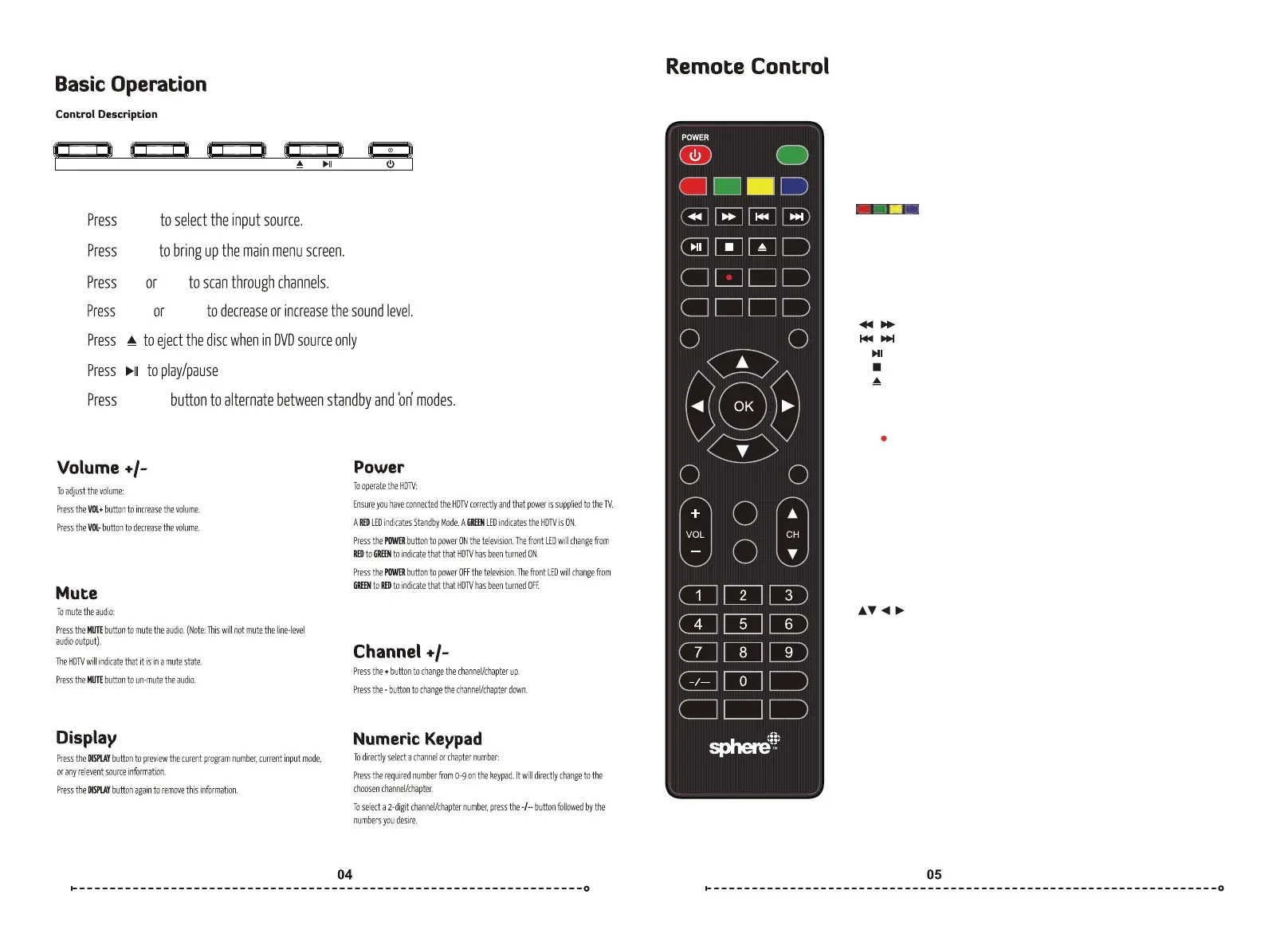
POWER: Switch between Standby and On.
AUTO TUNE: AUTO TUNE “DTV” ONE TOUCH TUNE.
ANGLE: Press to choose a different angle.(DVD)
LANGUAGE: Press to choose a different language.(DVD)
DVD SETUP: Press to display the DVD setup menu.
DVD MENU: Press to return back to previous DVD menu.
: Refer to the screen to see its funcon.
REVEAL: Reveal or hide the hidden words.
SIZE: Change the size of display in teletext mode.
HOLD: Press to hold on/off the current page display in Teletext mode.
S.PAGE: Display a sup-page of upper Teletext opons.
TEXT: Press to turn the Teletext on or off.
INDEX: Press to return to the index/inial page.
T.SHIFT: Press to switch to me shi mode.
: Play fast backward/forward.
: Play previous/next media file.
: Play/pause.
: Stop playing.
: Eject the DVD source.
AUTO: Autonacally adjusts the picture in PC mode.
DVD TITLE: Press to display DVD tle informaon.
TV/RADIO: Press to switch between DTV and radio programs.
REC : Press to record the program immediately.
REPEAT: Press to select the repeat mode in USB / DVD mode.
R.LIST: Press to display the recorded list.
A-B: Repeat the segment between A and B.
FAV: Press to display favorite programs.
NICAM/A2/AUDIO: Cycles through LR/LL/RR sound modes in ATV/DTV/USB
mode.
ASPECT: Select the screen aspect.
P.MODE: Select the picture mode.
S.MODE: Select the audio mode.
MUTE: Press to mute the audio. Press again or press VOL+ to resume.
SOURCE: Select the TV input source.
/OK: Allows you to navigate the on-screen menus and adjust the
system sengs to your preference.
MENU: Access the on-screen menu.
EXIT: Exit the menu or sub-menu.
VOL+/-: Press to increase or decrease volume.
DISPLAY: Press to display the current source and channel informaon.
FREEZE: Press to freeze current picture.
CH+/-: Press to change channel.
NUMBER BUTTONS: Press 0-9 to select a TV channel directly when watching TV.
The channel changes aer 2 seconds or press enter to change immediately.
_ /__: Swap between single, double, triple and quadruple digit input.
RECALL: Return to previously viewed program.
EPG: Press to display EPG informaon. (Electronic Program Guide) (DTV only)
S.TITLE: Press to display subtles on the screen or turn off the subtles.
SLEEP: Set the TV to turn off aer a specified me.
VOL- INPUT
INPUT
Remote control for no-smart models
MENU
MENU
CH+
POWER
VOL+ VOL-
CH-
CH+ CH- VOL+
AUTO TUNE
MUTE
SOURCE
DISPLAY
EXIT
MENU
FREEZE
RECALL
EPG S.TITLE SLEEP
ANGLE
LANGUAGE
DVD SETUP DVD MENU
TEXT
REVEAL SIZE S.PAGE
INDEX T.SHIFT AUTO
FAV
A-B
R.LIST
TV/RADIO
DVD TITLE
REPEAT
REC
AUDIO
NICAM/A2 ASPECT P.MODE S.MODE
HOLD


 To Next Page