Ages 8 to
COLOR CODE
Power–blue
Input–pink
Output–green
Wire–orange
You always need a blue and a
green; pink and orange are
optional, in between.
NUMBER
The number module displays information about the
signal it’s receiving from your other modules. It has
two modes: in “value” mode, it displays a number
from 0 to 99 on its LED display, where 0 is totally
off, and 99 is all the way on. In “volts” mode, it
displays the actual voltage on the signal pin, from
0.0 to 5.0 volts. It takes the same signal it receives
and sends it out to the next module.
MORE INFO littleBits.cc/Bits/number
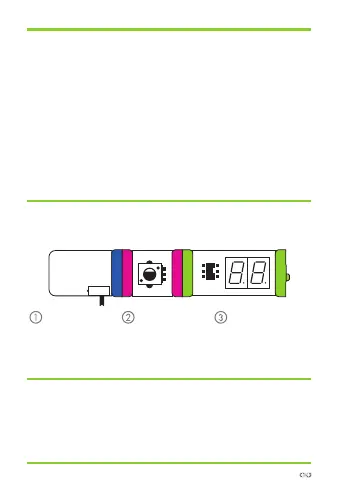
TRY THIS CIRCUIT
Start with a
blue power
module and
turn it on.
Snap any pink
input module
before the
number module.
Use the number
module after
your input to
measure.
power dimmer number



 To Next Page