Ages 8 to
COLOR CODE
Power–blue
Input–pink
Output–green
Wire–orange
You always need a blue and a
green; pink and orange are
optional, in between.
pulse
Try This circuiT
The pulse is like an electronic heartbeat. It sends
out a stream of short on signals, and you can make
the speed of the pulses faster or slower using the in-
cluded screwdriver. It’s great for making LEDs blink!
Try This circuiT
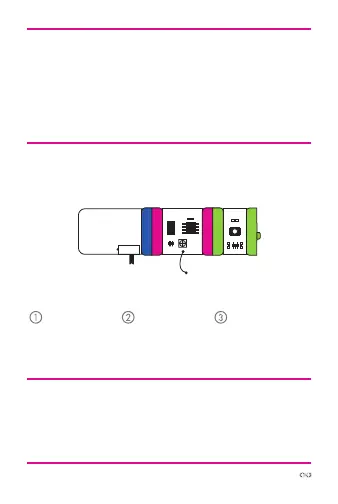
power LEDpulse
Start with a
blue power
module and
turn it on.
Use the screw-
driver to adjust
the “speed” of
the pulse.
Watch your
green output
module activate!
More info littleBits.cc/Bits/pulse
ate
r



 To Next Page