COLOR CODE
Power–blue
Input–pink
Output–green
Wire– orange
You always need a blue and a
green; pink and orange are
optional, in between.
Ages14 to
sequencer
Try This circuiT
The sequencer allows you to connect up to eight outputs
(labeled 1 through 8) and control them in sequential patterns.
In “step” mode, the sequence will advance every time the
module receives a high signal at the input, like pressing a but-
ton. In “speed” mode, the sequence will advance at a speed
determined by the input signal. Try using a dimmer to control
the speed. It also features a four-position switch that lets you
select the direction the sequence runs. The bitSnap
TM
at the end
of the module pulses at the same speed as the sequencer.
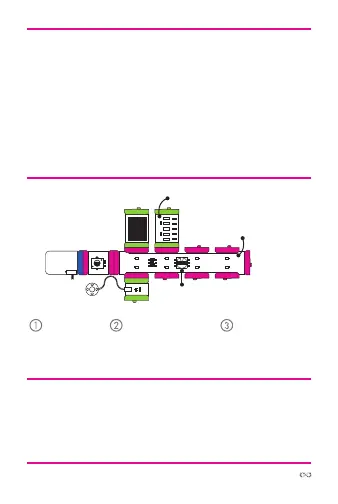
Start with a
blue power
module and
turn it on.
Place a dimmer af-
ter the power and
set the sequencer
to “speed” mode.
Attach output
modules to se-
quencer and see
what happens!
More info littleBits.cc/Bits/sequencer
vibration
motor
power
dimmer
sequencer
buzzer bargraph
ca
bapud)
snml
sci“”e



 To Next Page