Ages 8 to
COLOR CODE
Power–blue
Input–pink
Output–green
Wire–orange
You always need a blue and a
green; pink and orange are
optional, in between.
ENVELOPE
MORE INFO littleBits.cc/Bits/envelope
TRY THIS CIRCUIT
The envelope modifies the loudness contour of a
sound. It takes a sound input and shapes it into
something you’d hear from an acoustic musical in-
strument, like a piano or saxophone. This envelope
has two controls: “attack”, which is how long it
takes to ramp up to maximum volume, and “decay”,
which is how long it takes to fade to silence again.
You can use its third bitSnap
TM
to trigger the enve-
lope from different sources, like the keyboard.
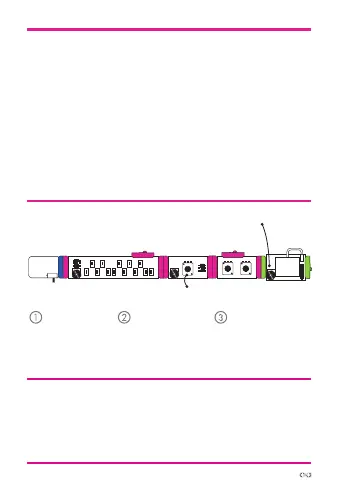
power envelopekeyboard oscillator
Start with a
blue power
module and
turn it on.
Press keys on
keyboard to
make sounds.
Adjust the “attack”
and “decay”
settings to shape
your sounds.
atu
atto
synth
speaker



 To Next Page