Ages 8 to
COLOR CODE
Power–blue
Input–pink
Output–green
Wire–orange
You always need a blue and a
green; pink and orange are
optional, in between.
RANDOM
MORE INFO littleBits.cc/Bits/random
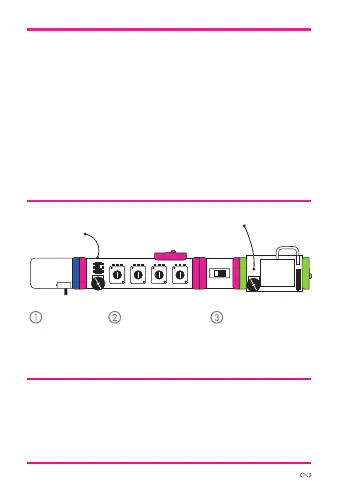
TRY THIS CIRCUIT
Start with a
blue power
module and
turn it on.
Set the random
module to “random
voltage” mode.
Adjust the knobs on
the micro sequencer
to set the range of
random voltages.
power random
The random module has two modes: “noise” and
“random voltage.” In “noise” mode, it outputs
white noise, like a television set not tuned to any
channel. In “random voltage” mode, it outputs
random voltage signals that can control oscillators
and make them play random pitches. The random
module needs a clock input like the pulse or
micro sequencer. Adjust the speed to change the
random rate.
s
atu
micro
sequencer
synth
speaker



 To Next Page