Ages 8 to
COLOR CODE
Power–blue
Input–pink
Output–green
Wire–orange
You always need a blue and a
green; pink and orange are
optional, in between.
DELAY
The delay module takes incoming audio and repeats
it, like an echo. It has two knobs: “time”, which sets the
delay length between a sound and its repetition, and
“feedback”, which controls how many times the sound
repeats. Delays can be long and spacey, like shouting
into the Grand Canyon, or loud and crazy. This mod-
ule will play forever if you turn the “feedback” knob all
the way up. You can also shift the pitch of a sound by
turning the “time” control while a sound is repeating.
MORE INFO littleBits.cc/Bits/delay
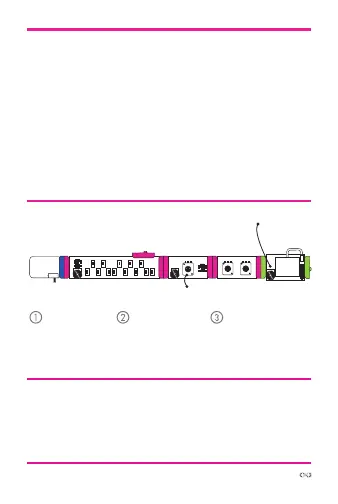
TRY THIS CIRCUIT
Start with a
blue power
module and
turn it on.
Press keys on
keyboard to
make sounds.
Adjust the “time”
and “feedback”
knobs to change the
delay of the sound.
power delaykeyboard oscillator
atu
atto
synth
speaker



 To Next Page