Ages 8 to
COLOR CODE
Power–blue
Input–pink
Output–green
Wire–orange
You always need a blue and a
green; pink and orange are
optional, in between.
MICRO SEQUENCER
MORE INFO littleBits.cc/Bits/micro-sequencer
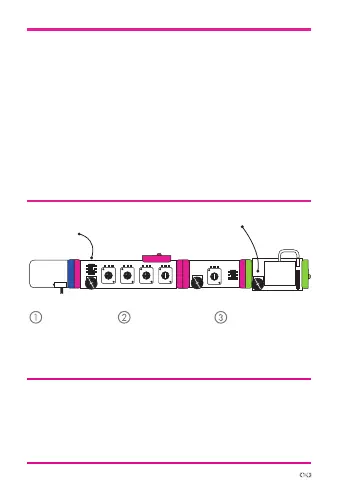
TRY THIS CIRCUIT
Start with a
blue power
module and
turn it on.
Adjust the
oscillator “pitch”
so you can
hear it.
Adjust the knobs
on the micro
sequencer to
create a melody.
power oscillator
micro
sequencer
The micro sequencer sends out voltages based on the
position of each of the four “step” knobs. Connect it to an
oscillator and it will step through the “sequence” consecutive-
ly to make a melody (The LEDs tell you which step is active).
Turn a knob fully counterclockwise to make the step silent.
Use the module in “speed” mode to set the speed using the
dial, or flip the switch to “step” mode to use an input module
like a pulse or button for control. It also has a “trigger out”,
which you can send to any of your other modules.
s
atu
synth
speaker



 To Next Page