Ages 8 to
COLOR CODE
Power–blue
Input–pink
Output–green
Wire – orange
You always need a blue and a
green; pink and orange are
optional, in between.
fork
The fork gives you more options for connecting
your modules: it lets you connect a single module
to as many as three others. The fork is an amazing
way to raise the level of complexity in any project.
More info littleBits.cc/Bits/fork
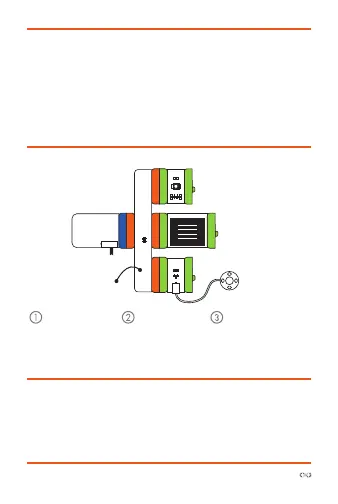
Try This circuiT
Start with a
blue power
module and
turn it on.
Snap the fork
after it.
Snap up to 3
green outputs to
the fork and see
them activate!
power
fork
LED
buzzer
vibration
motor



 To Next Page