Ages 8 to
COLOR CODE
Power–blue
Input–pink
Output–green
Wire–orange
You always need a blue and a
green; pink and orange are
optional, in between.
latch
More info littleBits.cc/Bits/latch
try this circuit
Use the latch to turn any momentary input, like a
button, into an on/o switch. If you place a button
in front of the latch, and a light after, pressing the
button once will turn it on and keep it on. Pressing
it again will turn it o. Try placing a sound trigger
in front of the latch and a light after it, then, just
snap your fingers!
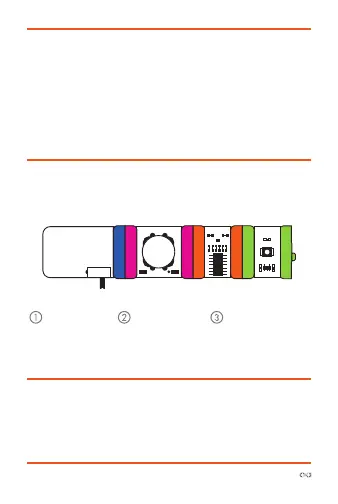
try this circuit
power button latch LED
Start with a
blue power
module and
turn it on.
Snap any pink
input module
after it.
Snap the latch
before your output
and see how it
aects the output.



 To Next Page