Ages 8 to
COLOR CODE
Power–blue
Input–pink
Output–green
Wire–orange
You always need a blue and a
green; pink and orange are
optional, in between.
dc motor
try this circuit
The DC (or “direct current”) motor rotates a
shaft when you send it an on signal. The “left/
right” switch controls the direction of rotation. The
motorMate makes it easy to attach wheels, paper,
cardboard and lots of other materials to the motor.
Simply slide it on the “D” shape of the shaft. A
LEGO axle also ts in the end.
try this circuit
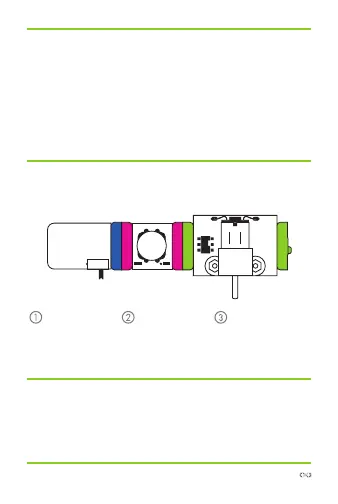
power DC motorbutton
Start with a
blue power
module and
turn it on.
Snap any pink
input module
after it.
Watch your DC
motor spin, spin,
spin!
more info littleBits.cc/Bits/dc-motor
TM



 To Next Page