The CK-A139 is an upper arm digital blood pressure monitor designed for easy and accurate blood pressure measurements at home. It features clinically proven accuracy and a one-touch operation, making it user-friendly for individuals monitoring their health. The device includes a large LCD display for clear readings and offers 2x99 memories, allowing two users to store up to 99 measurements each. It also incorporates a pressure rating indicator and an optional voice broadcast feature for added convenience.
Function Description
The primary function of the CK-A139 is to measure both systolic (upper) and diastolic (lower) blood pressure values, as well as pulse rate. It utilizes the oscillometric method for measurement. The device is designed to provide readings equivalent to those obtained by a trained person using the cuff/stethoscope auscultation method, within the limits prescribed by American National Standard electronic or automated sphygmomanometers.
The monitor helps users track their blood pressure over time, which is crucial for managing conditions like hypertension. Regular measurements at home can offer valuable insights into blood pressure values under everyday conditions, providing a more comprehensive picture than occasional doctor's office visits. The device also includes a time and date display, ensuring that all stored measurements are recorded with the correct timestamp.
Usage Features
- One-Touch Operation: The device is activated with a single press of the Start/Stop button, simplifying the measurement process.
- Cuff Placement: The cuff should be fastened on the palm side of the upper arm, approximately one inch (2-3cm) from the crook of the arm, ensuring it is not too tight. The cuff should be at heart level during measurement for consistent and accurate readings. The unit can be used on either the left or right arm; however, it is recommended to consistently use the same arm.
- User Selection: Before measurement, users can select their profile (User 1 or User 2) using the USER or SET button, ensuring measurements are stored in the correct memory bank.
- Measurement Process: After fastening the cuff and selecting the user, pressing the ON/OFF button initiates the measurement. The display will show all information for about 1 second, then the cuff will automatically inflate. Once the pulse rate is detected, a heart mark will flash on the display with accompanying sounds. After the measurement is complete, blood pressure values (systolic and diastolic) and pulse rate are displayed with sound, and the air in the cuff is released automatically.
- Automatic Shut-off: If the unit is not manually switched off, it will automatically power down after approximately 2x99 seconds to conserve battery life.
- Memory Function: The monitor can store 99 readings for each of the two users. When the memory is full, the oldest values are overwritten.
- Average Readings (AVG): The CK-A139 can display the average of the latest three readings. This feature is accessible by pressing the MEMORY button when the device is off or after a measurement.
- Recalling Stored Readings: To review past measurements, press the MEMORY button. The AVG reading will be displayed first, followed by individual stored readings in reverse chronological order (most recent first). The date and time will alternate with the blood pressure values.
- Deleting Stored Readings: To delete previous readings, turn off the device, press and hold the SET button until 'DEL' appears, then press the MEM button to confirm deletion.
- Speaker Control (Optional Voice Broadcast): The speaker can be turned on or off. To do this, turn off the device, press and hold SET for 5 seconds, use MEM to select the user, then navigate with MEM until "SP ON/Off" appears, select the desired option with MEM, and acknowledge with SET.
- Alarm Setting: The device allows setting alarms for consistent daily monitoring. This is configured through the same menu as the speaker control.
- Time and Date Setting: After inserting batteries, it's important to set the correct time and date so that all stored measurements are accurately timestamped. This involves pressing the SET button to cycle through year, month, date, hour, and minute, and using the MEMORY button to adjust the values.
Maintenance Features
- Battery Insertion: The device uses four AAA alkaline batteries. To insert them, pull off the battery cover, insert batteries matching the correct polarities (+ and -), and then replace the cover. The battery symbol on the display indicates low battery, prompting replacement. It is recommended to replace all batteries at the same time with the same type and make. Do not mix old and new batteries.
- Power Source Options: In addition to batteries, the device can be powered using a DC 6V adaptor or equivalent. A USB cable is included for power supply only and can be connected to a mobile charger, laptop USB port, or power bank (not included). It is crucial not to plug the device directly into 220V electricity; an equivalent DC6V adaptor is always needed.
- Cleaning: The BP monitor should be cleaned with a soft cloth. Avoid using fuel, thinner, or other solvents. Specks on the cuff can be removed carefully with a wet cloth and soap water. Do not wash the cuff.
- Storage: Do not expose the monitor to extreme temperatures, moisture, dust, or direct sunlight. If the unit is stored at temperatures below 0°C (32°F), allow it to warm up for about 15 minutes before use to ensure proper cuff inflation.
- Handling Precautions: Treat the cuff with care, avoiding stress from torsion or kinking. Do not drop the BP monitor or treat it with force. Do not attempt to open or disassemble the unit, as this will invalidate the factory calibration. Do not crush the cuff.
- Long-Term Storage: If the unit will not be used for an extended period (30 days or more), remove the batteries to prevent leakage and damage.
- Calibration: The product is calibrated at the time of manufacture. Periodic recalibration is not required if used according to the instructions. If accuracy is questioned, contact an authorized Service Center.

 Need help?
 General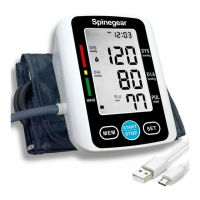

 To Next Page