10
Adjust the Belt
Important: Adjust the belt only if you are
experiencing slippage under high resistance. Improper
belt adjustment will cause premature wear and may
void the Spinning® Bike Limited Warranty.
To adjust the belt:
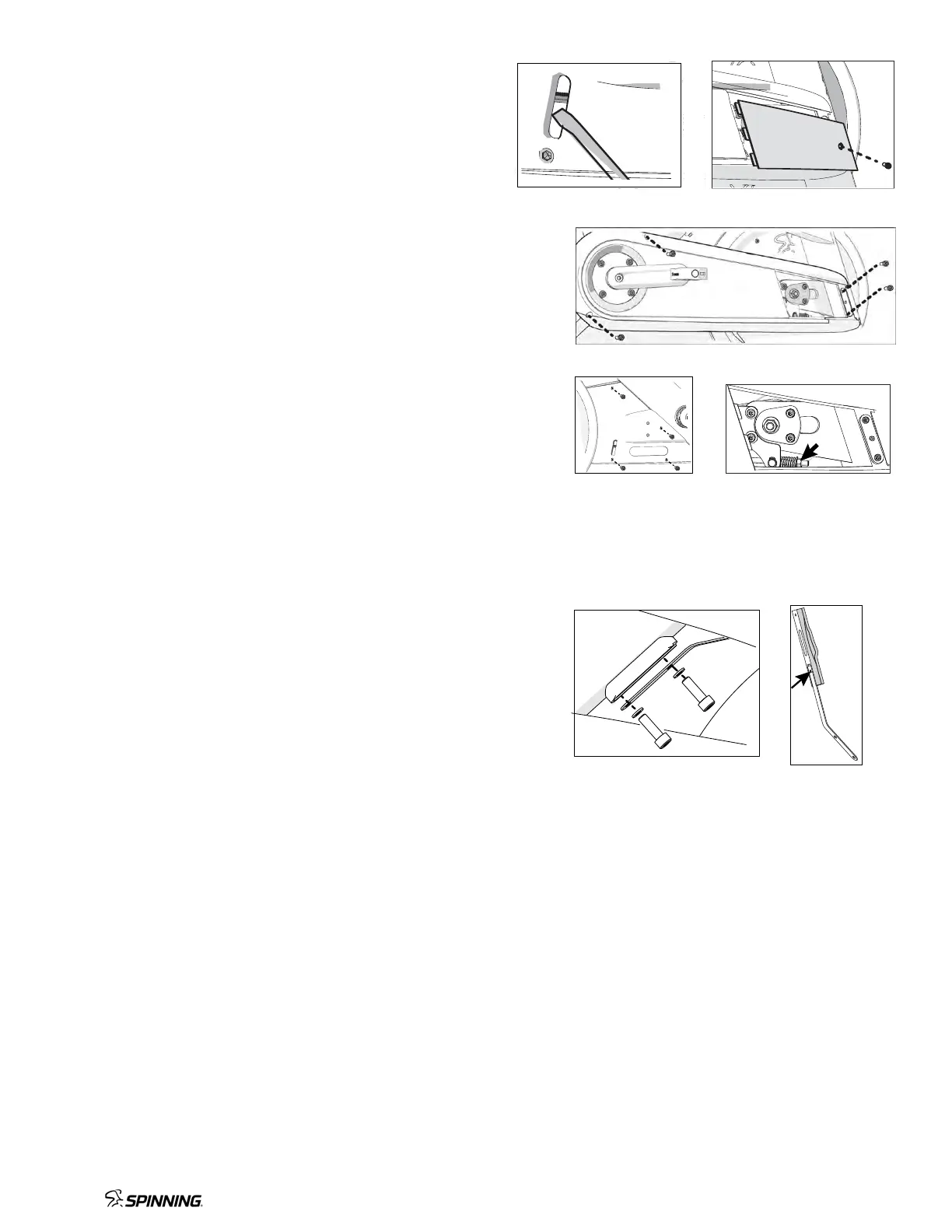
1. Loosen the bolt and remove the cover window (Figures 1 & 2).
2. Loosen the four bolts holding on the cover and remove it
(Figure 3).
3. Remove the four bolts holding on the back cover and remove it
(Figure 4).
4. Turn the nut clockwise one full turn. Ride the bike at high
resistance. If you still experience slippage, turn the nut
clockwise one more full turn. Repeat until there is no
slippage. (Figure 5).
Important: If the belt is stretched beyond adjustment,
replacement of the belt is recommended.
5. Check that the belt moves smoothly by slowly turning the
crank arm while keeping your fingers away from the belt.
6. Replace the covers.
Replace the Brake Pad
Your bike comes with a spare brake pad. To order more pads,
contact Spinning® Customer Support.
To replace the brake pad:
1. Remove tension from the brake pad by turning the resistance
knob counterclockwise (–) until completely loose.
2. Using a 5 mm hex key, remove the two bolts holding the
brake pad against the frame (Figure 6).
3. Remove the bolt on the brake pad with a 3 mm hex key
(Figure 7).
4. Replace the brake pad and secure it with the bolt removed in
Step 3.
5. Pull up the resistance knob and slide the new brake pad into
place. Secure it using the two bolts removed in Step 2.
Figure 3
Figure 4 Figure 5
Figure 6 Figure 7
Figure 1 Figure 2


 To Next Page
 Loading...