EasyManua.ls Logo

Spirit RS User Manual

Spirit RS
27 pages
To Next Page IconTo Next Page
Page #1 background imageLoading...
Page #1 background image
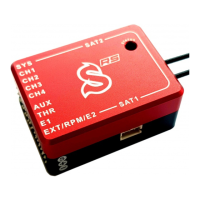
Spirit RS is stabilisation system for R/C aircrafts featuring control unit and receiver in one extraordinary
packageǃ
It combines the best available technologies from both worlds to offer cutting edge experience.
In other words, Spirit RS consists from Spirit 2 hardware and JETI Duplex receiver.
Control part
12-axis Sensor Fusion
Performance-line ARM processor
Receiver part
JETI Duplex 2.4Ghz full-range telemetry receiver
To ensure pilot can operate model reliably and safely with the highest standard in R/C industry, all DUPLEX
radios can be easily bound.
With additional DUPLEX TU2 module Spirit RS can be operated also with any other radio!
For our pilots we offer the latest JETI model DS-12, that is 16 channel radio, tailored specially for Spirit RS.
Following pages are covering complete setup of your radio and unit to prepare everything for the first flight.
Question and Answer IconNeed help?

Do you have a question about the Spirit RS and is the answer not in the manual?

Spirit RS Specifications

General IconGeneral
BrandSpirit
ModelRS
CategoryControl Unit
LanguageEnglish

Summary

SpiritRS Safety

SpiritRS Preparation

Basic Helicopter Settings

Configure flight modes for Autorot. and Idle modes using switches.

SpiritRS Mounting

Unit Mounting

Mount the unit perpendicular to rotational axes, considering vibration and space.

Antenna

Position antennas perpendicular to each other, avoid sharp bends and covering.

SpiritRS Wiring

Servo Wiring

Connect servos to CH1, CH2, CH3, CH4 based on elevator position (front/rear).

Power Supply

Connect BEC/battery to THR, E1, AUX ports. Avoid E2 pin for future use.

SpiritRS Telemetry

Telemetry Sensor Wiring

Wire JETI sensors to E1 port (JETIBOX/EXBUS) or EXT port (JETIBOX only).

Telemetry Sensor Data

Configure displayed telemetry data on the Main screen via Displayed Telemetry menu.

Spirit Telemetry

Interface ESC and Spirit telemetry variables for data like voltage, current, RPM.

SpiritRS Binding

Binding Procedure

Connect bind plug, power unit and radio. Confirm receiver detection on the radio.

Not Recognized by Radio

Troubleshoot binding if radio doesn't recognize the receiver; use Pair primary module.

SpiritRS Setup

Spirit Integration

Interface for configuring the Spirit unit, allowing parameter changes and tuning.

Configuring Receiver Part

Configure E1 telemetry port using Device Explorer, select REX-RS device for settings.

Spirit RS Setup Wizard

Prepare unit for flight via Setup Wizard, a one-time process for new models.

SpiritRS Computer

SpiritRS FCC