EasyManua.ls Logo

Sports Tutor Pickleball Tutor Spin - User Manual

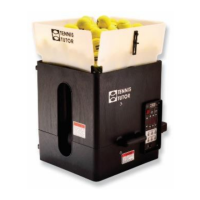
Sports Tutor Pickleball Tutor Spin
8 pages
Print Icon
To Next Page IconTo Next Page
Loading...
In tro duc tion
This manual con tains im por tant in for ma tion con cern ing the pro per use and care of your
Pickleball Tutor Spin or Pickleball Tutor Plus ball machine. Please read completely before
operating your ball machine.
Please call us toll free at 1-800-448-8867 if you have any questions about your
Pickleball Tutor Spin or Pickleball Tutor Plus ball machine.
IMPORTANT: Read the battery charging instructions on page 2.
Check for shipping damage
Even though your machine may appear un da ma ged, it is pos sible for inter nal parts to be
dama ged even if the exter nal case is un -da ma ged. If your machine is dama ged from improper
handling during shipping, con tact Sports Tutor im me diately at 1-800-448-8867.
Save the ori ginal ship ping car ton
The ori ginal car ton should be used if it ever
becomes nec es sary to ship your Pickleball
Tutor to the factory for serv ice under
war ranty.
What’s Inside
Page
Important Warnings 2
Pickleballs 2
Battery Charging 2
Operating Pickleball Tutor 3
Setting Ball Trajectory 3
Control Panel - Pickleball Spin 4
Control Panel - Pickleball Plus 5
Transporting and Storage 6
Maintenance and Cleaning 6
Warranty 7
Extended Warranty 8
OWNER’S MANUAL
PICKLEBALL
TUTOR Spin
PICKLEBALL
TUTOR
BY SPORTS TUTOR
Plus
Question and Answer IconNeed help?

Do you have a question about the Sports Tutor Pickleball Tutor Spin and is the answer not in the manual?

Overview

The Pickleball Tutor Spin and Pickleball Tutor Plus are ball machines designed to assist with pickleball practice. They are suitable for both outdoor and indoor pickleballs, though indoor balls are typically softer and will eject with slightly less speed. For optimal consistency, it's recommended to use the same brand and type of ball.

Function Description:

The primary function of these machines is to throw pickleballs, allowing users to practice various shots and drills. They feature adjustable settings for ball speed, trajectory, and oscillation.

Important Technical Specifications:

  • Battery: The machines come with a "Smart" charger. The Smart battery charger should be connected continuously when not in use to maintain a full charge without overcharging, even during long periods like winter storage. The LED light on the charger indicates charging status: RED for charging and GREEN when fully charged. A full recharge typically takes 10 to 16 hours. It's crucial not to allow the battery to completely discharge or store the machine for long periods without being charged, as this can decrease battery life.
  • Start-up Time Delay: Both models have a 10-second start-up time delay before pickleballs begin to be thrown. This delay resets if the machine is turned off and then on again.
  • Oscillation (Pickleball Tutor Spin and Plus): The oscillator function allows for sweeping shots across the court. Models with the optional 2-Line feature can alternate shots to two preset positions. The machine only alternates between these two positions when a ball is ejected.
  • Interval (Pickleball Tutor Plus): The interval setting controls the frequency of ball throws, ranging from one ball every 10 seconds at the lowest setting to one ball every 1 second at the highest setting, ideal for quick volley drills.
  • Ball Speed: Adjustable, increasing clockwise to increase the speed at which balls are thrown.
  • Spin Control (Pickleball Tutor Plus): The spin dial allows for adjusting the amount of topspin or backspin. Turning clockwise from FLAT increases topspin, while turning counter-clockwise from FLAT increases backspin.

Usage Features:

  • Operating Procedure: To operate, turn the machine 'ON' and set the desired ball throws. After use, turn the machine 'OFF' and wait five seconds for the start-up time delay to reset before turning it 'ON' again (and Oscillator 'ON' if desired) and walking to your playing position.
  • Ball Trajectory:
    • Manual Elevation Models: Trajectory is adjusted by loosening the ball trajectory knob (counter-clockwise), bracing the machine, and moving the knob up to increase height or down to decrease height. Once the desired trajectory is achieved, tighten the knob firmly (clockwise).
    • Electronic Elevation Models: Trajectory is adjusted by pushing the UP or DOWN elevation button on the control panel. On the Pickleball Tutor Spin model, an elevation indicator moves up or down to show the trajectory position.
  • Remote Control (Optional): For models with wireless remote, turn the remote switch to ON. The hand-held remote transmitter can be used to alternately stop and start the ball feed function, and to stop/resume oscillation at a given position.
  • Battery Charging Jack: Located on the machine (battery models only), this is where the Smart Battery Charger is connected to recharge the battery.
  • Reset Button (Pickleball Tutor Plus): If the machine shuts off during play, check if the reset button has tripped. If so, turn the machine OFF, remove all balls from the hopper, check for any wedged balls under the lower wheel or on the ball track, remove any obstructions, press in the reset button, and then test.
  • Portability: Both models are designed for easy transport. The Pickleball Tutor Spin can be pulled behind you using its towing handle, and the machine can also be carried by the spin carry handle. The Pickleball Tutor Plus comes with large towing wheels and a pull/carry handle for easy transporting.

Maintenance Features:

  • Ball Cleaning: Ball throws can become less consistent if the ball throwing wheels accumulate "slick film" from new pickleballs. Periodic cleaning of the wheels is necessary to maintain consistent throws. Some coloration from balls can transfer to the wheels but this is normal and will not affect ball throws.
  • Cleaning Throwing Wheels: The ball throwing wheels on the Pickleball Tutor are OFF. The most effective means of cleaning the wheels is with a 80-100 grit sandpaper sponge. Regular sandpaper can be used, but a sandpaper sponge is easier to hold and more effective. Reach into the ball ejection opening and hold one of the throwing wheels still. Sand the entire circumference of each wheel a section at a time. Go around each wheel 2-3 times using firm pressure. If the throwing wheels appear to have developed a grooved or "cupped" appearance, this would indicate excessive wear and the wheels should be replaced. If cleaning the throwing wheels does not improve performance, contact Sports Tutor.
  • Case Cleaning: To clean the case, use a slightly damp cloth. Do not use chemicals or abrasive cleansers. A vacuum cleaner can be used to clean dirt from the inside of the machine. Do not use compressed air.
  • Storage: Store the Pickleball Tutor in a clean, dry place. It is important to keep the smart battery charger plugged into an AC power outlet and the charging jack while in storage to maintain a charge on the battery. Do not store the Pickleball Tutor in the trunk of a car. Heat build-up inside a car trunk can reach 180 degrees during summer months, which may damage the machine.

Important Warnings:

  • Do not stand in front of the ball ejection opening.
  • Do not insert hands or foreign objects into the machine.
  • Do not operate the Pickleball Tutor when wet.
  • Never put wet balls in the Pickleball Tutor.

Warranty:

Sports Tutor, Inc. warrants the Pickleball Tutor ball machines for a period of three years from the date of original purchase, except for the battery, which is warrantied for one year. The warranty covers all defects in material and workmanship. It does not cover units with altered serial numbers, damage from accident, misuse, abuse, neglect, unauthorized modification, failure to follow instructions, unauthorized repair, or shipping damage. The warranty is valid only within the United States for the original purchaser and any subsequent owner(s) during the warranty period, provided a copy of the original bill of sale is submitted. Sports Tutor will pay for labor, materials, and shipping charges for warrantable defects within the United States. To obtain service, call or write Sports Tutor, Inc., and deliver the unit POSTAGE PREPAID with your name, address, phone number, copy of original bill of sale, and a description of the problem. Implied warranties are limited to the duration of this warranty. Sports Tutor is not responsible for incidental or consequential damages. An optional 2-year extended warranty is available for an additional cost, purchased within 30 days of the machine's purchase.

Sports Tutor Pickleball Tutor Spin Specifications

General IconGeneral
BrandSports Tutor
ModelPickleball Tutor Spin
CategorySports & Outdoors
LanguageEnglish

Related product manuals