36
FUNCTIONS INSTRUCTION
Operation is as follows:
1. Pre-set user’s U1-U4 personal information (Sex / Age / Height / Weight), user input real personal information(Sex/
Age / Height / Weight), and the console will calculate the value accordingly.
2. Select manual control (MANUAL) / programme control (PROGRAMS) /Watt constant setting (WATT CONSTANT) /
personal programme control (PERSONAL) / heart rate control (H.R.C). User can select different control modes, please
refer to the following respective main control mode specifications. Execute manual control (MANUAL) /programme
control ( PROGRAMS) / Watt setting (WATT CONSTANT) / personal programme control (PERSONAL) /heart rate
control (H.R.C).
3. Setting TIME / DISTANCE /CALORIES / WATTS) / HEART RATE
Setting and input user’s information, functions display value then counts down to 0; or user does not need to set
value, then the console will automatically accumulate from 0 when user starts to exercise.
Heart Rate reply
When PULSE detection, pressing heart rate reply key can start detect heart rate reply function, test time from one
minute counting down to 0:00, heart rate symbol will flicker until 0. Please touch hand bar closely with your during
one minute, when console countdown time is 0, console will read user’s heart rate reply F1~F6 grade.
Heart rate grade User heart rate status Heart rate detect distance
(before/after test)
F1 Excellent Average gap 50
F2 Great 40-49
F3 Good 30-39
F4 Normal 20-29
F5 Need to increase 10-19
F6 Exercise is not sufficient 10 below
Function Mode
MANUAL – Enter into this mode to set 1~24 resistance, and provide user setting time for each function, such as
TIME / DISTANCE / CALORIES / PULSE, then press “start/stop” key to start exercise.
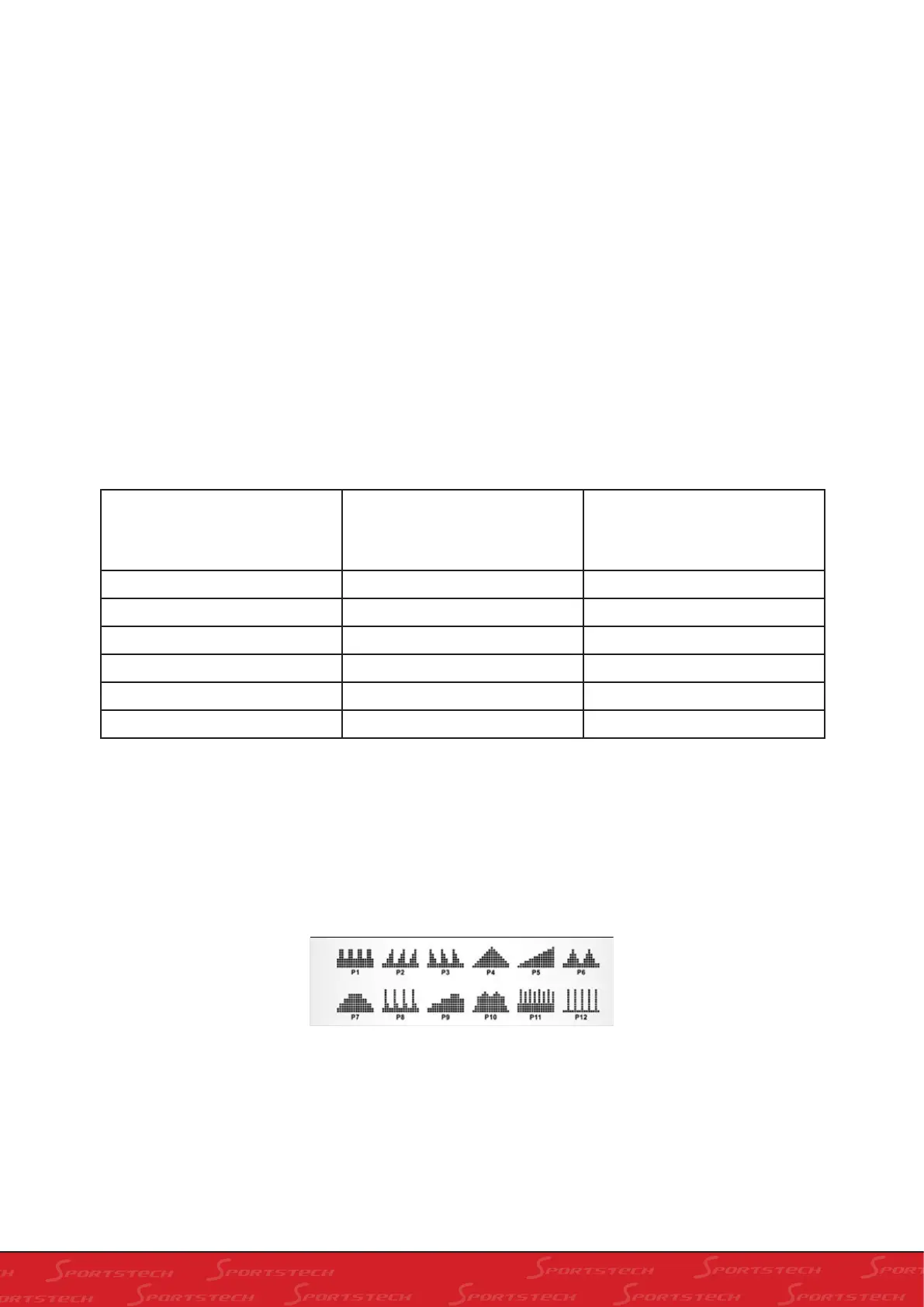
PROGRAM - console provides 12 kinds graph, to simulate 12 kinds of different resistance roads, let user challenge
himself, use increase/reduce to select suitable resistant graph, it is flickering when you select graph, then press”Mode”
to confirm
WATT CONSTANT - User sets Watt constant value according to self physical fitness 10-350, when fixing Watt value,
press”start/stop” key, use Watt fixed value as exercise target.


 To Next Page