EasyManua.ls Logo

SpotOn GPS FENCE - User Manual

Default Icon
32 pages
Print Icon
To Next Page IconTo Next Page
Loading...
1
SPOTON USER GUIDE
User Guide

Questions and Answers

  • B
    beckjeremyAug 12, 2025
    Why am I not receiving notifications from my SpotOn GPS FENCE Pet Care Product?
    • R
      rebecca77Aug 12, 2025
      If you are not receiving notifications, or can't activate tracking or refresh your dog’s location, verify that you have an active cellular subscription. If you don’t, go to www.spotonfence.com/pages/subscription to subscribe. If you have a cell plan, ensure you have cell service.
  • D
    Dana SimonAug 16, 2025
    What to do if my SpotOn Pet Care Product collar won’t charge?
    • D
      David WallaceAug 16, 2025
      If your SpotOn collar isn’t charging (no flashing green light), consider these potential causes and solutions: * Ensure the collar is fully seated in the charging base and that the cable and wall charger are properly connected. * If the collar was used in salt, lake, or pool water, rinse it with tap water. * Check and clean the charge contacts on both the collar and charging base, ensuring they are free of dirt and dry. * Try connecting the USB cable to a different power supply. * Use a different USB cable or connect to a different AC power source.
  • M
    Matthew MillsAug 20, 2025
    How to adjust the strap on SpotOn Pet Care Product?
    • C
      cleeAug 20, 2025
      To adjust the strap, loosen the clasp and slide it toward the center of the collar for a tighter fit, or toward the end of the strap for a looser fit. Make sure to lock the clasp in place before fitting the collar on your dog.
  • J
    Justin MooreAug 23, 2025
    What to do if my SpotOn Pet Care Product app indicates poor GPS signal?
    • J
      John WoodAug 23, 2025
      If the app shows a poor GPS signal, move outdoors. Wait a few minutes, ensuring the GPS antenna is pointing toward the sky.
  • N
    Natalie ParsonsAug 27, 2025
    How to fix flashing white LED status indicator on SpotOn GPS FENCE?
    • I
      iwatsonAug 28, 2025
      If the collar LED status indicator is flashing white, move outdoors and wait a few moments for the SpotOn to acquire a GPS signal.
  • T
    Tanya BooneAug 31, 2025
    What to do if I can't connect to my SpotOn GPS FENCE Pet Care Product collar using the app?
    • L
      landrychristopherAug 31, 2025
      If you're unable to connect to your collar using the app, bring the collar and your phone within a few feet of each other. Also, check that Bluetooth is enabled on your phone.
  • W
    walterwilliamSep 4, 2025
    How to update SpotOn GPS FENCE collar?
    • P
      patriciamcintoshSep 4, 2025
      The app will notify you if a software update is available for your collar. Simply follow the provided instructions to update it.
  • J
    Jennifer JohnsonSep 7, 2025
    How to turn on SpotOn Pet Care Product collar?
    • A
      Abigail EsparzaSep 8, 2025
      Place the collar on the charger and allow the system to charge for about an hour.

Summary

Getting Started

How SpotOn works

Explains the SpotOn GPS Fence system and its core technology.

Whats in the box

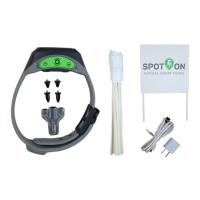
Details the components included with the SpotOn GPS Fence device.

Fit the collar

Provides guidance on adjusting and fitting the SpotOn collar to your dog.

Set Up

Step 1: Set up the collar and app

Guide to initial setup of the SpotOn collar and mobile application, including charging and app download.

Step 2: Create and test a fence

Instructions for defining, creating, and verifying virtual GPS fence boundaries with alert zones.

Step 3: Train your dog

Methods for training your dog to respond to fence alerts and corrections, including static and vibration feedback.

Using SpotOn

Check collar status

How to verify the operational status of the SpotOn collar using the LED indicator.

Battery information

Details on the collar's battery life and charging status indicators.

Keep tabs on your dog with a cellular plan

Information on using cellular data for real-time dog tracking and receiving notifications.

Care and maintenance

Guidelines for cleaning and maintaining the SpotOn collar's durability and waterproof standards.

Troubleshooting

Common issues and solutions

Table providing solutions for common problems encountered with the SpotOn system, such as power or connectivity issues.

Regulatory Information

FCC and Industry Canada compliance

Details on the device's compliance with radio frequency and interference regulations.

Terms of Use

Product usage terms and privacy policy

Outlines the terms of service and privacy policy for the SpotOn product and associated services.

SpotOn GPS FENCE Specifications

General IconGeneral
TypeGPS Dog Fence
TechnologyGPS
Waterproof RatingIP67
Mobile AppYes
Fence SizeUp to 1, 000 acres
Pet CompatibilityDogs
RangeVaries based on environment
AlertsAudible tone, vibration, and mobile app notifications
Collar SizeAdjustable, fits neck sizes 10-26 inches
Battery Life (Alternative)Up to 36 hours
Collar Weight4.8 oz

Related product manuals