09
GAMETRAKA - PERFORMANCES
REMOVE SEGMENTS
IN A PERFORMANCE
1 Navigatetothedetailedviewofyourperformancebyclickingonaperformance.
ClickTrim inthelefthandcontrolpanel.Awindowwillappearwiththeeditingtools.
Usingtheeditingtools:
2 Clickanddragtoselectasegmenttocutout.Multipleselectionscanbeselected.
•Doubleclickonaselectiontobringitback.
• Hovering on View Selectionwillshowthesectionsthatarebeingremoved.
3 Onceyouarehappywithyourselection,clickDeletetopermanentlyremoveit.
Toaddsegmentsmanually:
1 Navigatetothedetailsofanyperformanceandclickonaperformance.
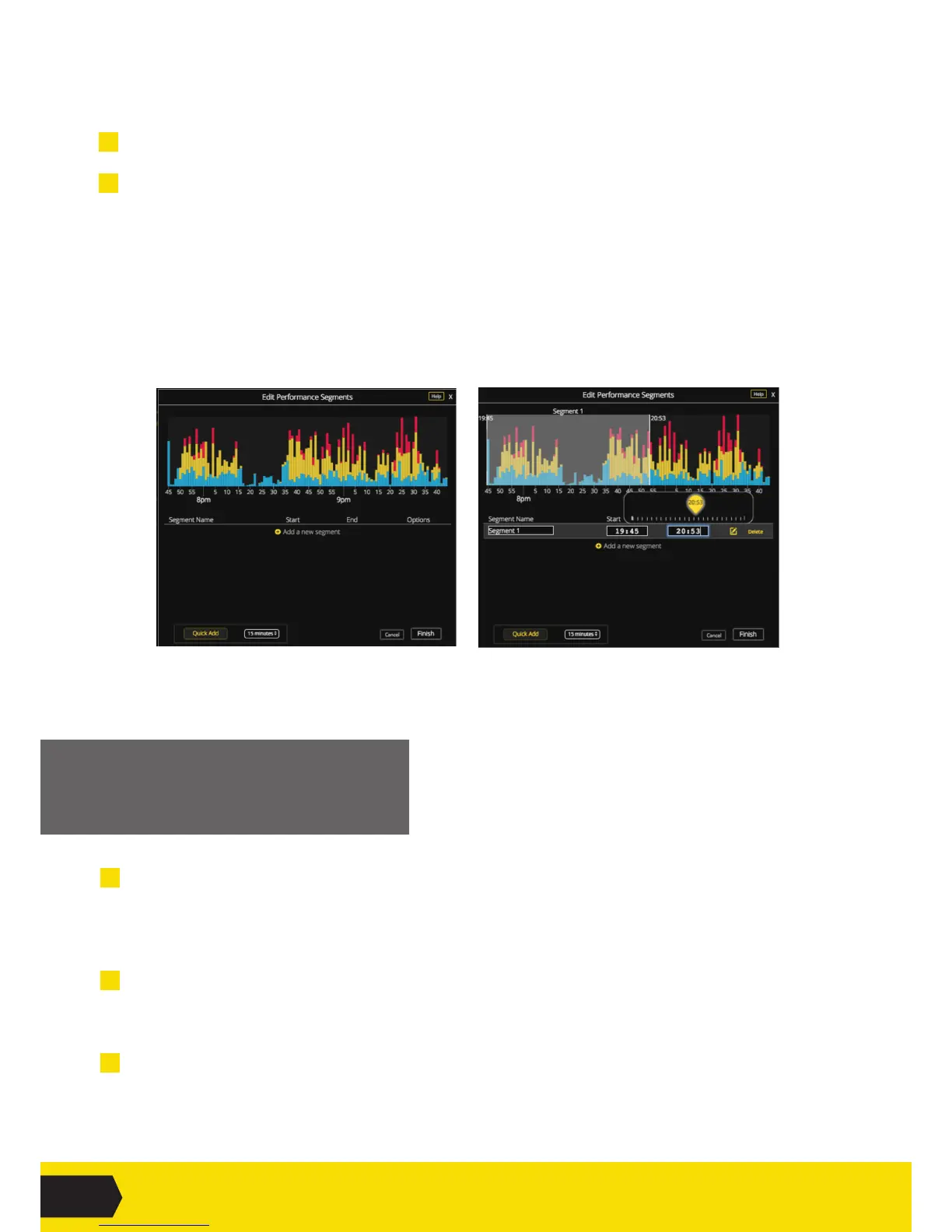
2 Ontheleftsidebar,click Create Segments.Aneditingtoolwillopen(Fig6)
i.ClickAdd a New Segment to create a custom segment.
ORclickQuick Add to create a segment of a pre-determined size.
Creatinganewcustomsegmentwillhighlightthewholeperformance.
i. Change the selection by dragging either end of the selector.
OReditthe‘Start’or‘End’timesmanually.Aneditingwindowwillopen(Fig7).
ii. Ensure the segment has a name.
iii.ClickFinishwhenyou’redone.
FIG6
FIG7


 To Next Page
 Loading...