1
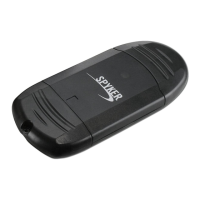
USBCARDREADERC206
INSTALLATIONGUIDE
EN
Thank you for buying this USB v2.0 memory card reader, you’ll be able to access your data
storedinyourmemorycards.Smallandcompact,youwillbeabletobringitwithyouwhereveryou
go.ThisUSBcardreadersupportsWindowsVistaBoosttechnologyandispoweredby
USBport.
Features
Easytouse,compact,streamlinedesignonitsshapeandlightweight
CompliantwithUSBv2.0andUSBv1.1
USBpowered
USBandmemorycardcoverprotect
Memory card support : MMC I/MMC II/RS MMC/MMC Micro/SD/SDHC/ULTRA II SD and mini
SD/EXTREMESD/MICROSDwithadapter
WindowsVistaBoost
technology
CompatiblewithWindowsME/2000/XP/VISTA/7
Systemrequirements
ComputerwithUSBport
WindowsME/2000/XP/Server2003/VISTA/7
Installation
Openthememorycardprotectcoverandpluginthememorycard.
Move USB cover and plug‐in the card reader to your USB computer port. The system will
automaticallyinstallthedriver.
Put
theUSBandmemorycoversinsafeplacebecauseyouwillneedthem.Donotlosethembecause
youwillnotbeabletoprotectagainthecardreader.
SaferemovaloftheUSBcardreader
ToremovesafelytheUSBcardreader,clickonthegreenarrowbelowtheleft
taskbar.
ClickonSafelyRemoveHardware.
Ifyoucannotmanagetosafelyremove,closeMycomputer,allwindowsandallapplications.
ThenclickagainonSafelyremoveHardware.
AwindowwillvalidateunderWINDOWSthepossibilitytosafelydisconnecttheUSBcardreader.
ClickOK.YoucanunplugtheUSBreaderfromthecomputer.Ifyou
pullouttheUSBreader,youcan
havesome troublethrough a warning message which can lead to a computercrashandthelossof
yourpreciousdata.
Ifyoudisconnectitbrutally,youmight haveacomputercrashandloseyourdata.
Moreover, the electronic parts of the card reader
may be subjected to overload peaks which can
loweritslifespan.
FAQ
USB card reader is not recognized by the system, check the connection and USB port. Check if you
haveinsertmemorycard.Unplugandplugagainthecardreader. CheckinthemotherboardBiosthat
youhave
enableUSBLegacysupport.
ThisproductisincompliancewiththeessentialrequirementsoftheEuropeanDirectivesforwhichitisconcerned.
Youcandownloaddeclarationofconformityonthewebsite:http://www.spyker‐france.com
Copyright©2016.SPYKER.Allrightsreserved


 To Next Page
 Loading...