DRILL MOUNT (OPTION 2)
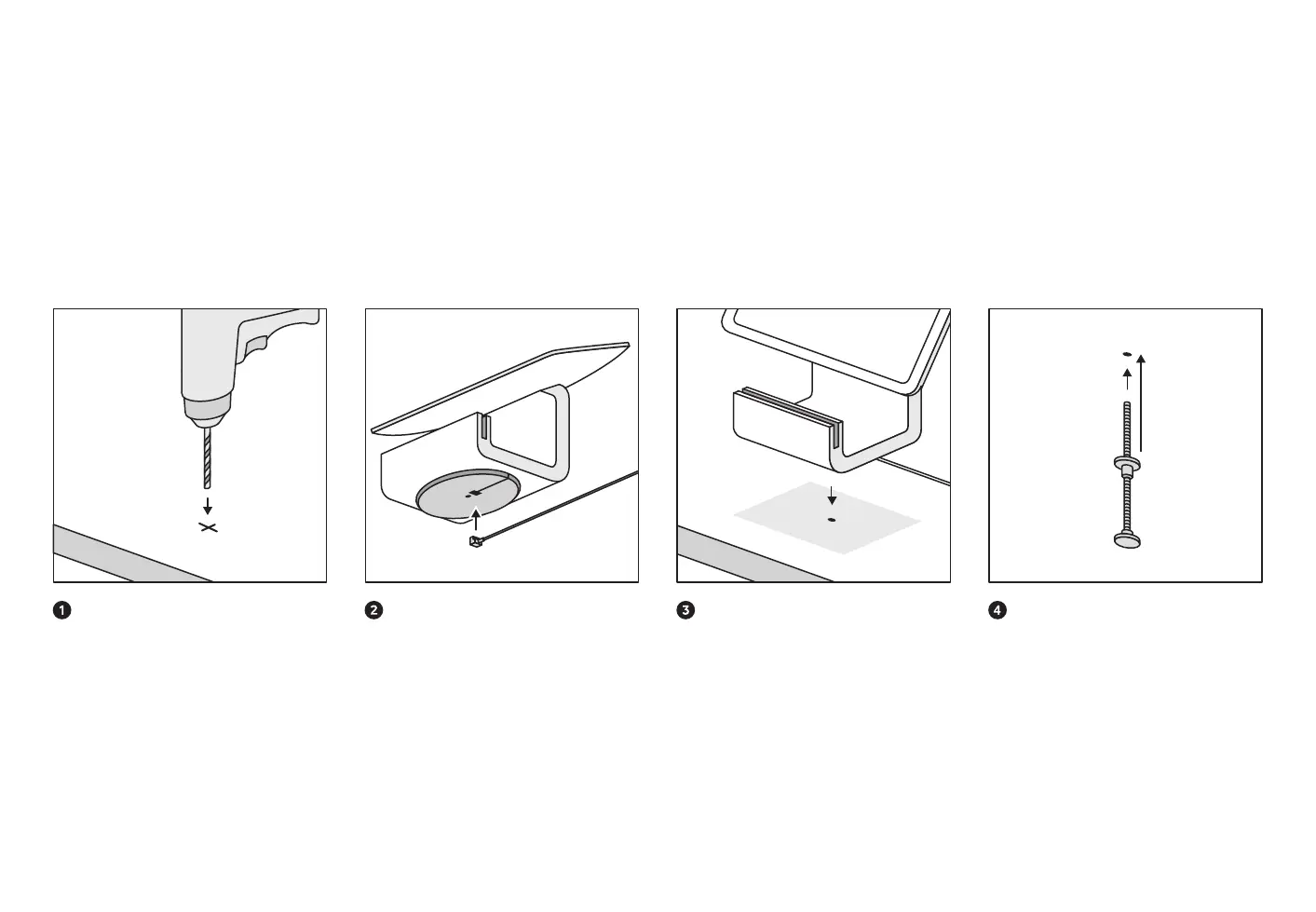
Secure Stand to your counter with a drill and the included drill mount.
Drill the hole for the drill mount
With a 3/16" drill bit, drill a hole into your
counter. Make sure your bit will work on
your counter material.
Plug the hardware hub into Stand
Plug the cable from the hardware hub into
the bottom of Stand. Note: If the cable exits
the base of Stand on the right side (when
the screen faces you), Stand will swivel
clockwise. If the cable exits the base on the
left side, Stand will swivel counterclockwise.
Line up Stand with the drill hole
Line up the screw hole in the base of Stand
with the hole in your counter. Double-check
that the base of Stand is locked with the
cable exiting from your preferred side.
Mount Stand to your counter
Screw the drill mount into the base of Stand
through the bottom of your counter. Turn the
nut until it’s firmly against the bottom of your
counter. Make sure the drill mount and Stand
are secure and Stand can only swivel on a
180-degree axis.


 To Next Page