Registered in England No. 88907
Tel: 01902 308050 Fax: 01902 308051 E-Mail: info@henry-squire.co.uk Website: www.squirelocks.co.uk
Henry Squire & Sons Limited
Hilton Cross Business Park, Cannock Road, Featherstone, Wolverhampton, WV10 7QZ
ES
GB
DE
FR
TM
Hoe de KeyKeep2 sluiten
1. Sluit de binnenkap die de knoppen bevat.
2. Met de binnenkap rechtop en bijna in de
gesloten stand (deze sluit nog niet). Druk op de
gemarkeerde knop aan de onderkant van het
toetsenblok. En vervolgens op uw CODE
3. Druk op de knop met de pijl naar beneden en
houd deze ingedrukt, hierdoor komt de
vergrendeling vrij en kunt u de kap in de
gesloten stand klikken.
4. Sluit de buitenste weerbeschermkap.
NL
TM
Zamykanie KeyKeep2
1. Zamknij wewnętrzną osłonę, zakrywającą
przyciski.
2. Przytrzymaj osłonę pionowo, niemal w zamkniętej
pozycji (jeszcze nie uda się jej zamknąć). Naciśnij
oznaczony przycisk znajdujący się na dolnej części
klawiatury, a następnie wpisz swój KOD.
3. Naciśnij i przytrzymaj oznaczony przycisk ze
strzałką skierowaną w dół. To spowoduje zwolnienie
zatrzasku i umożliwi zatrzaśnięcie osłony w pozycji
zamkniętej.
4. Zamknij zewnętrzną osłonę, chroniącą przed
warunkami pogodowymi.
PL
TM
Как закрыть KeyKeep2
1. Закройте внутреннюю крышку, под которой
расположены кнопки.
2. Когда внутренняя крышка будет в
вертикальном положении и почти закрыта (она
еще не полностью закрыта), нажмите на кнопку в
нижней части клавиатуры и введите свой КОД.
3. Потяните вниз и удерживайте кнопку со
стрелкой, направленной вниз. Это разблокирует
упор и позволит защелкнуть крышку.
4. Закройте внешнюю защитную крышку.
RU
TM
Como fechar o KeyKeep2
1. Feche a tampa interior que aloja os botões.
2. Com a tampa interior erguida e quase na
posição fechada (mas sem fechar), pressione o
botão marcado na parte inferior do teclado e
depois marque o seu CÓDIGO.
3. Pressione e mantenha pressionado o botão
marcado com a seta para baixo. Isto libertará o
engate, permitindo que clique na tampa para
que esta fique na posição fechada.
4. Feche a tampa exterior impermeável.
PT
TM
Come chiudere KeyKeep2
1. Chiudere lo sportello interno dove sono collocati i
pulsanti.
2. Con lo sportello interno in posizione verticale e
quasi chiuso (non è ancora possibile chiuderlo
completamente), premere il pulsante in basso sul
tastierino e, di seguito, il CODICE personale.
3. Tenere premuto il pulsante con la freccia verso il
basso: questa operazione di rilascio permette di
chiudere completamente lo sportello. A questo
punto si sente un clic.
4. Chiudere lo sportello protettivo esterno anti-
intemperie.
IT
TM
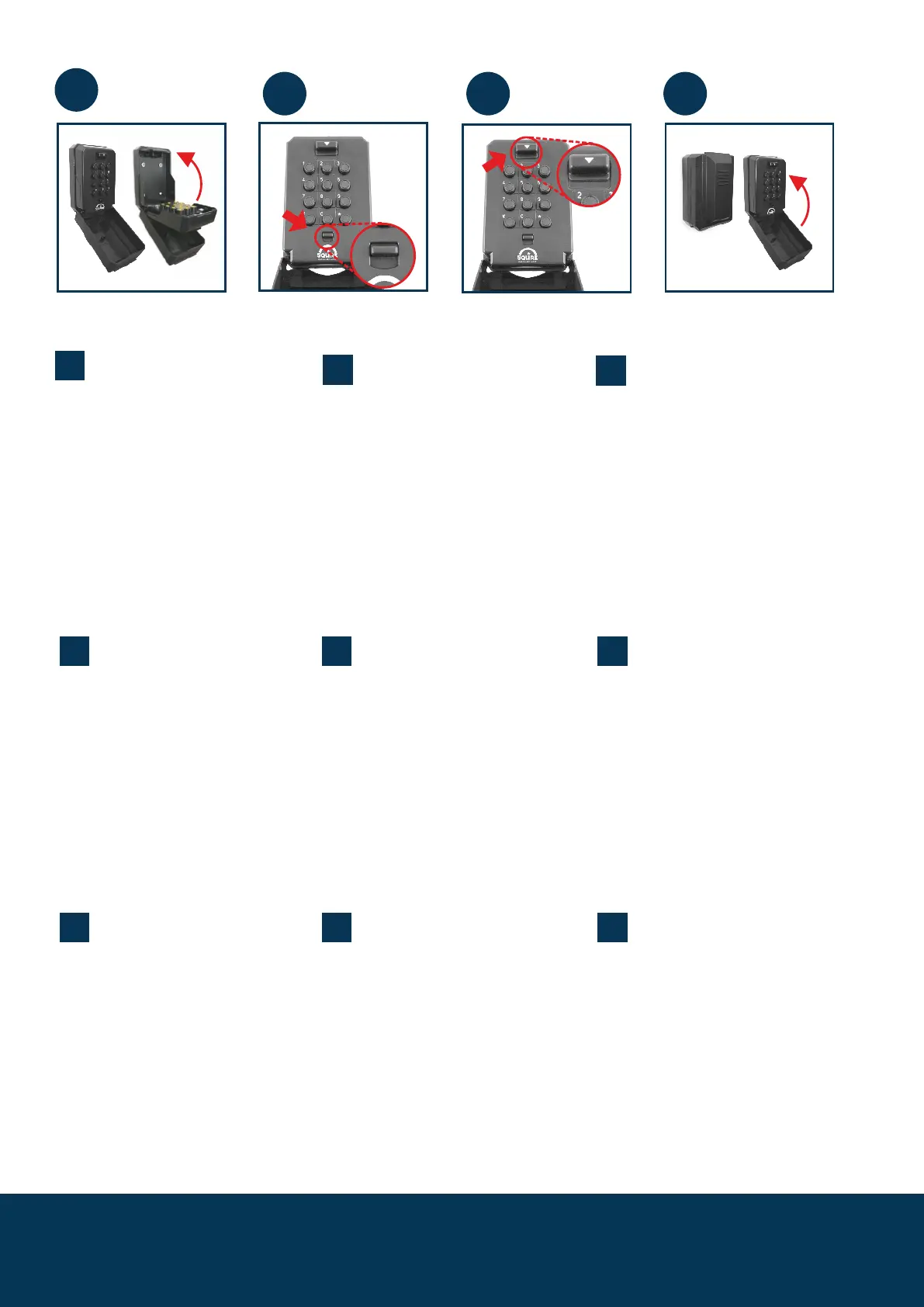
How to close KeyKeep2
1. Close the inner cover that houses the buttons.
2. With the inner cover upright and nearly in the
closed position (it won't close yet). Press the
button marked at the bottom of the keypad -
And then your CODE
3.Press and hold down the button marked with
the down arrow, this releases the catch and will
enable you to click the cover into the closed
position.
4. Close the outer weather protective cover.
TM
So schließen Sie den KeyKeep2
1. Schließen Sie die innere Tastenabdeckung.
2. Wenn die innere Abdeckung aufrecht und fast
geschlossen ist (sie lässt sich noch nicht ganz
schließen), drücken Sie auf den Knopf unten an der
Tastatur - und geben Sie danach Ihren CODE ein.
3. Halten Sie die Taste mit dem Pfeil nach unten
gedrückt. Damit wird der Verschluss geöffnet und
Sie können die Abdeckung in der geschlossenen
Position einrasten lassen.
4. Schließen Sie die äußere
Wetterschutzabdeckung.
TM
Comment fermer KeyKeep2
1. Fermer le couvercle intérieur qui contient les
boutons.
2. En maintenant le couvercle intérieur vertical et
presque en position fermée (il ne se fermera pas
encore), appuyer sur le bouton indiqué en bas du
pavé numérique- Puis saisir votre CODE
3. Appuyer (sur) puis maintenir enfoncé le bouton
indiquant une flèche vers le bas, cela libèrera le
cliquet et vous permettra de fermer totalement le
couvercle.
4. Fermer le couvercle extérieur de protection
climatique.
TM
Cómo cerrar la KeyKeep2
1. Cierre la cubierta interna en donde se
encuentran los botones.
2. Con la cubierta interna levantada y casi en su
posición cerrada (no se cerrará aún).Presione el
botón marcado en la parte inferior del tecladoy
luego ingrese su CÓDIGO
3.Presione y mantenga presionado el botón
marcado con la flecha hacia abajo. Esto libera el
seguro y le permitirá presionar la cubierta para
cerrarla.
4. Cierre la cubierta externa de protección contra
la exposición al clima.
1
2 3 4


 To Next Page
 Loading...