Ifanyissues,heretipsforyou꞉
1.FullchargeyourheadphonewithoriginalMicroUSB
ChargingCableand5-10Wpowerwallcharger(don'tuse
fastcharger)
2.Resetheadphonebyinsertingaudiocableintoheadphone
audiosocketthenremovingit.OrtheupgradedNC75Pro
headphoneswouldberesetautomaticallywhencharging.
DeletePairing꞉Holdboth"VolumeUp"and"VolumeDown"
buttonssimutaneouslyfor5seconds.OrholdbothMulti-
functionButtonand"VolumeDown"Buttonfor5seconds.
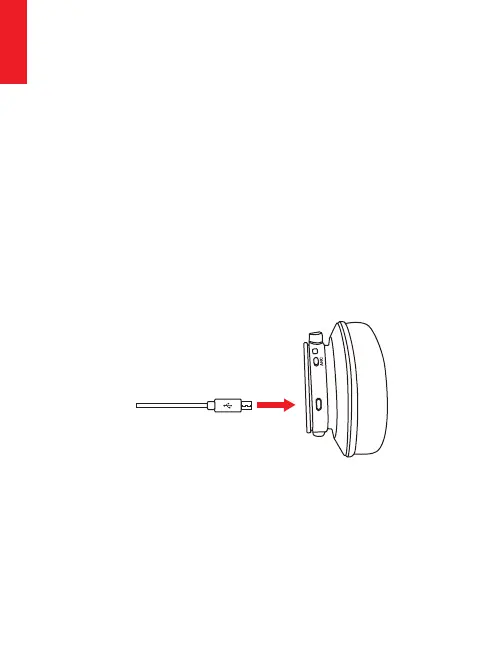
Charging
UsetheincludedmicroUSBchargingcabletoconnectto
headphoneChargingPort.Connecttheotherendofcharging
cabletoacomputerUSBportorUSBwallchargerunder6.3V
voltage.TurnoffheadphoneBluetoothandANCfunction
beforecharging.Headphonescan'tbeusedduringcharging
foryoursafety.TheLEDindicatorlightwillbeofforbluecolor
whenfullofchargebasingonheadphoneturnoffstatus.
StartyourmobilephoneBluetoothandfindheadphone
Bluetoothpairingname"SrhythmNC75Pro"toclickitto
pair.(theLEDindicatorlightwillbeblueflashingslowlyafter
pairingsuccessfully.)
HoldtheMulti-functionButtonfor3-5secondstoturn
headphoneBluetoothoff.
NOTE꞉Ambienttemperatureexceedsthecharging
temperaturerangeof32°F(0°C)-113°F(45°C).
Q&A
1.Q꞉Whycan'theadphonepairwithmymobilephone?
A꞉Pleasecheckifyourheadphoneisinpairingmodeorre-
connectionmode,checkifBluetoothsearchfunctionofyour
Bluetoothdeviceisturnedon,ifalldone,thengotoBluetooth
menuofyourBluetoothdevice,delete/ignoretheheadphone
Bluetoothpairingname"SrhythmNC75Pro".Afterthat,you
cantrytoreconnectBluetoothaccordingtoabove“Easy
Pairing”steps.
2.Q꞉Whycan'theadphoneturnon?
A꞉Pleasedoublecheckthebatterystatusofyourheadphone.
3.Q꞉CanIreplacebatteryintheheadphone?
A꞉No,youcannot.Headphoneusesabuilt-innon-detachable
Li-Polymerbatterythatcan'tbereplaced.
4.Q꞉CanIuseheadphonewhiledriving?
A꞉Foryoursafety,westronglyrecommendthatyoudonotuse
headphonewhiledrivingtoavoiddistraction.
5.Q꞉Whydoesheadphonesometimesdisconnectswith
Bluetoothdevicewithin10meters?
A꞉Pleasecheckifthereareanymetalmaterialsorobstacles
withinarelativelycloserangeoryoursurroundingsthat
perhapsinterferingwithBluetoothconnection.Thismay
happenbecauseBluetoothisaradiotechnologywhichis
sensitivetoobjectsbetweenheadphoneandotherdevices.
DeletetheBluetoothpairingnameonyourALLdevices(itwill
togglebetweenyourconnecteddevicesduetomulti-point
connection),restartit.thenresetyourheadphonebyinserting
theincludedaudiocableintoheadphoneaudiosocketand
removingit(sometimesneedtoinsertseveraltimestoreset
successfully),thenreconnectit.
6.Q꞉Whycan'tIhearanysoundfrommycomputerormobile
phone?
A꞉Pleasecheckifoutputchannelofyourcomputersupports
A2DPprofile.Alsocheckthevolumesettingsonyour
headphoneandcomputer/mobilephone.
English
13 14
English


 To Next Page
 Loading...