5 6
FunctionDetails
EasyPairing
1.HoldtheMulti-functionButtonfor3-5secondsto
turnheadphoneBluetoothon,thenenter pairing
mode.(theLEDindicatorlightwillbeblueandred
flashingquickly.)
2.Keepheadphoneandyourmobilephoneascloseas
possibleduringpairingprocess.
3.TurnonyourmobilephoneBluetooth.Searchfor
headphoneBluetoothsignalonmobilephoneand
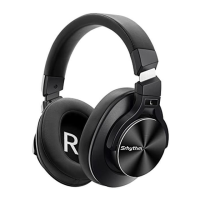
click“SrhythmNC95”topair.(theLEDindicatorlight
willbeblueflashingslowlyafterpairingsuccessfully.)
4.Ifyouareaskedforapassword/PINcodeduring
pairingprocedure,pleaseenter"0000"(fourzeros).
PairtotheSecondBluetoothDevice
Step1꞉PairNC95withFirstdeviceviaBluetooth
successfullyandthenturnofftheFirstdevice’s
Bluetooth.
Step2꞉PairNC95withtheSeconddevicevia
Bluetooth.
Step3꞉TurnonBluetoothofthefirstdeviceandpairit
withheadphoneagain.
NowbothofyourdevicesarepairedwithNC95for
easyswitching.
UseANCFunction
HowtoUse
ToturnonANC,presstheANCButtonwhenBluetoothturned
on;Longpress3secondstheANCButtonwhenBluetooth
turnedoff;
(theLEDindicatorlightwillbegreenwhenANCON)
ToturnoffANC,presstheANCButton;
(theLEDindicatorlightgreencolorwillbeoffwhenANCOFF)
UseBluetoothFunction
1.HoldtheMulti-functionButtonfor3-5secondstoturn
headphoneBluetoothon,thenenterpairingmode.(theLED
indicatorlightwillbeblueandredflashingquickly.)
2.StartyourmobilephoneBluetoothandfindheadphone
Bluetoothpairingname"SrhythmNC95"toclickitto
pair.(theLEDindicatorlightwillbeblueflashingslowlyafter
pairedsuccessfully.)
3.HoldtheMulti-functionButtonfor3-5secondstoturn
headphoneBluetoothoff.
Note꞉IfNC95isnotpairedwithanydeviceswithin5minutes
afterBluetoothturnedon,itwillautomaticallyshutdownto
savepower.
3‑5S
PresstheANCbuttontoswitchbetweenANCmode,Normal
modeandTransparencymode.
UseTransparencyFunction
Previoussong꞉pressthreetimes.Nextsong꞉presstwice.
Double-presstheMulti-functionButtontorejectan
incomingcall.
PresstheMulti-functionButtontoplay/pausemusicor
answer/endcall.
Adjustthevolumebyrotatingthemultifunctionbutton
clockwiseorcounterclockwise.
PresstheMulti-functionButton4timestoactivatevoice
assistant.
English
English


 To Next Page