HOW TO INSTALL AND REMOVE QTS SLEEVE
Use this position when loosening
and tightening.
Hold the club upright with
the grip resting on the ground.
Supporting the head in your hand,
gently insert the torque wrench
into the screw hole.
Shaft and torque
wrench should
form a straight line
Improperly aligned
torque wrench
Do not use any tool other than the supplied torque wrench.
Also do not use the supplied torque wrench on any other products.
Damaged QTS sleeve and/or improperly installed
QTS sleeve may result in injury or product damage.
* Not compatible with SRIXON Z-STAR series torque wrenches.
Position the torque wrench so that it is correctly aligned with the shaft.
Failure to insert the tip of the torque wrench firmly into the screw hole may
result in damage to the screw.
Using a golf club with a broken washer may damage the club head or the sleeve.
Always tighten until you hear a ‘click’.
Failure to tighten until you hear a ‘click’ may result in separation of the club
head or product damage.
Once you hear a ‘click’, stop tightening.
Over-tightening may damage the QTS sleeve.
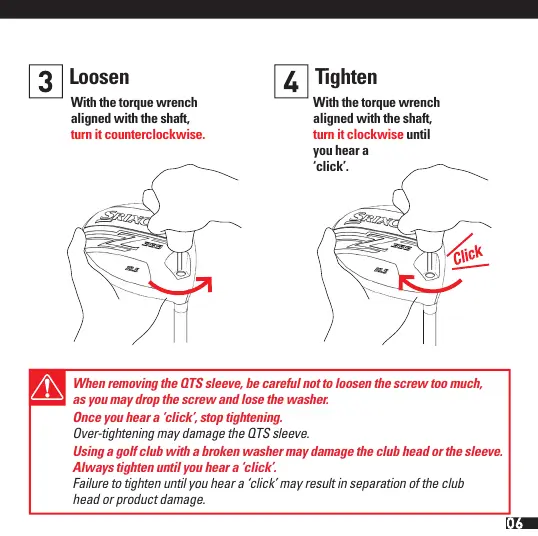
Loosen Tighten
With the torque wrench
aligned with the shaft,
turn it counterclockwise.
With the torque wrench
aligned with the shaft,
turn it clockwise until
you hear a
‘click’.
When removing the QTS sleeve, be careful not to loosen the screw too much,
as you may drop the screw and lose the washer.


 To Next Page