EasyManua.ls Logo

Ssl LOPRO10 - User Manual

Ssl LOPRO10
10 pages
Print Icon
To Next Page IconTo Next Page
Loading...
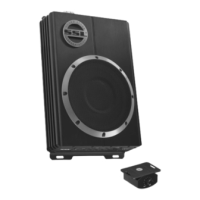
Congratulations on your purchase of the SSL LoPro10, amplified Under Seat Subwoofer.
It has been designed, engineered and manufactured to bring you the highest level of
performance and quality, and will afford you years of listening pleasure.
Thank you for making a SSL your choice for car audio entertainment!
LoPro10
10" Amplified Under Seat Subwoofer
High & Low Level Input
LED Status Indicator
Subwoofer Phase Control
Soft Remote Turn-0n
Subwoofer Remote Control
Variable Bass Boost
Low Pass Filter
Subsonic Filter
MAX Power: 1200 W x 1
Thermal, Short, Overload and Fuse Protection
Weight: 13 lbs

Questions and Answers

  • J
    John CabreraAug 14, 2025
    Why Ssl LOPRO10 Subwoofer amplifier will not power up?
    • C
      cmoodyAug 14, 2025
      If your Ssl Subwoofer amplifier isn't powering up, several factors could be at play. Start by verifying a solid ground connection. Ensure the remote input (turn-on) receives at least 9VDC and that the (+) terminal has battery power, with a minimum of 12V. Inspect all fuses, replacing any that are faulty. Also, check the protection LED; if lit, briefly shut off the amplifier before turning it back on.
  • J
    Joseph VelezAug 18, 2025
    What to do if my Ssl LOPRO10 has distorted sound?
    • C
      christineoliverAug 18, 2025
      If your Ssl Subwoofer produces distorted sound, verify that the input level control is appropriately set for the source unit's signal level, keeping it as low as feasible. Ensure all crossover frequencies are correctly configured. Also, inspect the speaker leads for any breaches or damage to the cable insulation.
  • M
    Matthew RamosAug 21, 2025
    How to fix engine noise in Ssl LOPRO10?
    • V
      Vanessa Hamilton DDSAug 21, 2025
      Engine noise in your Ssl Subwoofer setup is often due to substandard RCA cables that are susceptible to picking up radiated noise. Upgrade to high-quality cables and ensure they are routed away from any power cables.
  • J
    Jillian OwensAug 25, 2025
    How to stop engine noise (alternator whine) in Ssl Subwoofer?
    • M
      Melissa HughesAug 25, 2025
      To address alternator whine in your Ssl Subwoofer, first, check that the RCA grounds are not shorted to the vehicle chassis. Next, ensure the source unit has a proper ground connection. Finally, inspect the ground connection itself, ensuring it's clean and free of any paint.
  • D
    davidstoneAug 28, 2025
    What to do if Protection LED illuminates when Ssl Subwoofer amp is powered on?
    • M
      Melissa BellAug 28, 2025
      If the protection LED illuminates when your Ssl Subwoofer amp is powered on, reduce the volume control on the head unit to prevent overdriving. If the issue persists, further assistance is needed.
  • C
    Carrie NelsonAug 31, 2025
    What to do if Ssl LOPRO10 Subwoofer has no output?
    • A
      Austin BergAug 31, 2025
      If your Ssl Subwoofer has no output, start by checking all fuses to ensure they are intact. Verify that the unit is properly grounded and that the remote input (turn-on) receives at least 9VDC. Confirm that the RCA audio cables are correctly plugged into the appropriate inputs and inspect all speaker wiring.
  • M
    Meagan AllenSep 4, 2025
    How to eliminate hissing sound from Ssl LOPRO10?
    • D
      Dr. Robert Nguyen IISep 4, 2025
      To troubleshoot a hissing sound in your Ssl Subwoofer, disconnect all RCA inputs from the power sub’s control panel. If the hiss disappears, plug in the component driving the amplifier and unplug its inputs. If the hiss disappears at this point, continue until the faulty or noisy component is found. It is also advisable to set the amplifier’s input level control as low as possible.
  • K
    Katie WhiteSep 7, 2025
    Why is my Ssl LOPRO10 Subwoofer amplifier getting very hot?
    • K
      Kevin ArellanoSep 7, 2025
      If your Ssl Subwoofer amplifier is overheating, ensure there is adequate air circulation around the amp. Also, adjust the input gain to properly match the source unit.
  • W
    Walter WatkinsSep 10, 2025
    Why Ssl LOPRO10 Subwoofer has low output?
    • P
      Paul VillanuevaSep 10, 2025
      If your Ssl Subwoofer's output is low, try resetting the level control and check the crossover control settings.

Summary

Introduction

Notes

What is included?

Main Unit

Lists the primary amplified system component included in the package.

Accessories

Details included accessories such as the subwoofer remote control and high-level input harness.

Mounting Hardware

Specifies the mounting screws provided for installation.

Front Panel Controls and Features

LED Status Indicator

Explains the function of the LED, indicating power and protection status.

Sub Phase Control

Describes the phase adjustment feature for optimizing bass response.

Low Pass Filter (LPF)

Details the adjustable low-pass filter for setting the crossover frequency.

Bass Boost Control

Explains the bass boost feature and its adjustment range.

Subwoofer Subsonic Filter

Describes the adjustable subsonic filter for low-frequency cutoff.

Subwoofer Gain Control

Guides on setting the gain for optimal volume without distortion.

Subwoofer Remote Control Port

Explains the port for connecting the remote level control.

Rear Panel Controls and Features

RCA Inputs (Low Level)

Details using low-level RCA inputs for audio signal connection.

Speaker Input (High-Level)

Explains using speaker outputs for connection when RCA is unavailable.

Fuse

Specifies the fuse rating and replacement guidelines.

Power Terminals

Outlines requirements for power and ground connections.

Power Input Connections

Subwoofer Level Control

Mounting the subwoofer

Troubleshooting

Specifications

Ssl LOPRO10 Specifications

General IconGeneral
BrandSsl
ModelLOPRO10
CategorySubwoofer
LanguageEnglish

Related product manuals