BASIC OPERATION
-11-
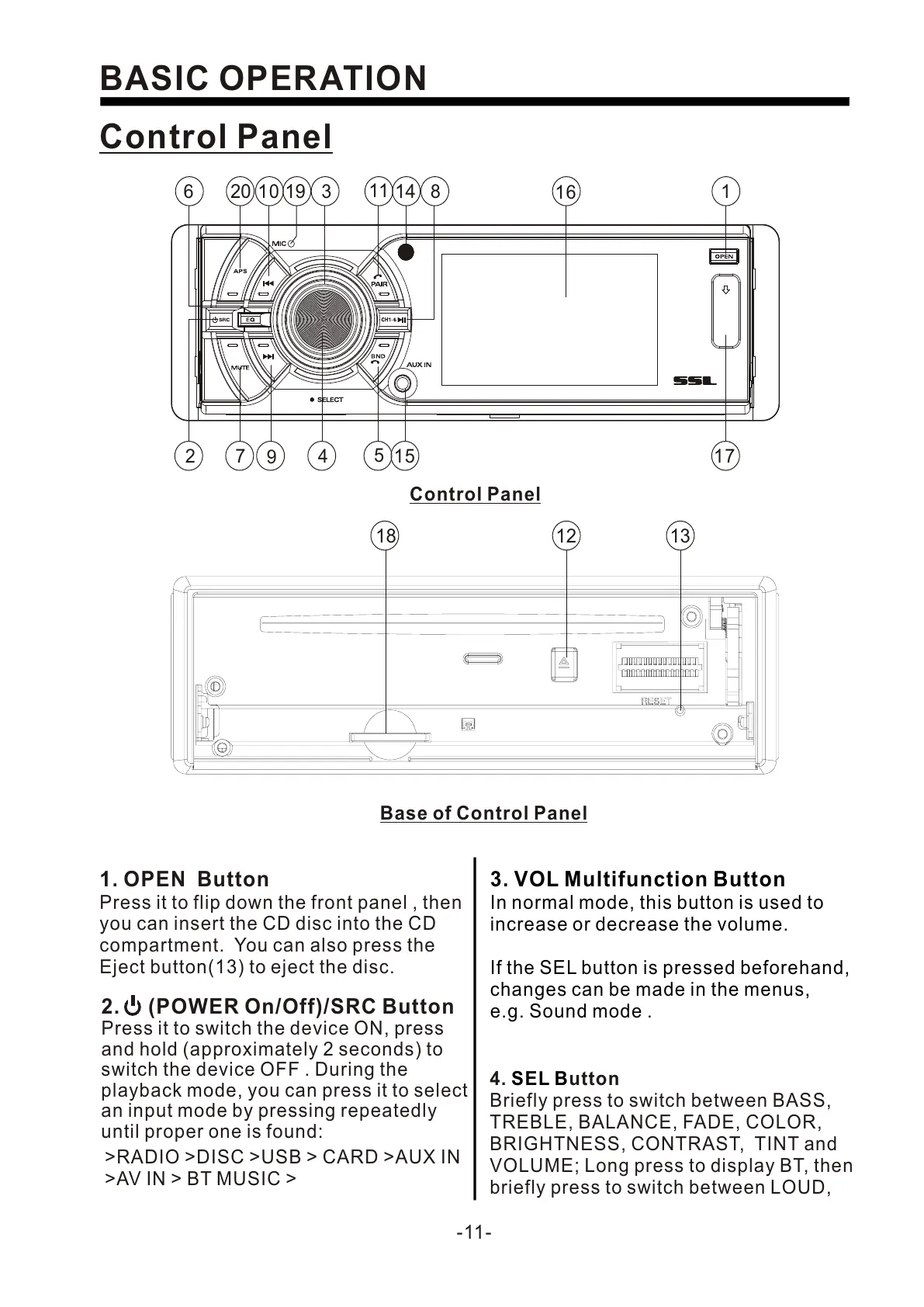
1. OPEN Button
Press it to flip down the front panel , then
you can insert the CD disc into the CD
compartment. You can also press the
Eject button(13) to eject the disc.
1318 12
2. (POWER On/Off)/SRC Button
Press it to switch the device ON, press
and hold (approximately 2 seconds) to
switch the device OFF . During the
playback mode, you can press it to select
an input mode by pressing repeatedly
until proper one is found:
>RADIO >DISC >USB > CARD >AUX IN
>AV IN > BT MUSIC >
Control Panel
Control Panel
Base of Control Panel
3. VOL Multifunction Button
In normal mode, this button is used to
increase or decrease the volume.
If the SEL button is pressed beforehand,
changes can be made in the menus,
e.g. Sound mode .
4. utton
Briefly press to switch between BASS,
TREBLE, BALANCE, FADE, COLOR,
BRIGHTNESS, CONTRAST, TINT and
VOLUME; Long press to display BT, then
briefly press to switch between LOUD,
SEL B
14
2
1
15
17
8
16
3
7
6
11
4
10
9
5
1920


 To Next Page
 Loading...