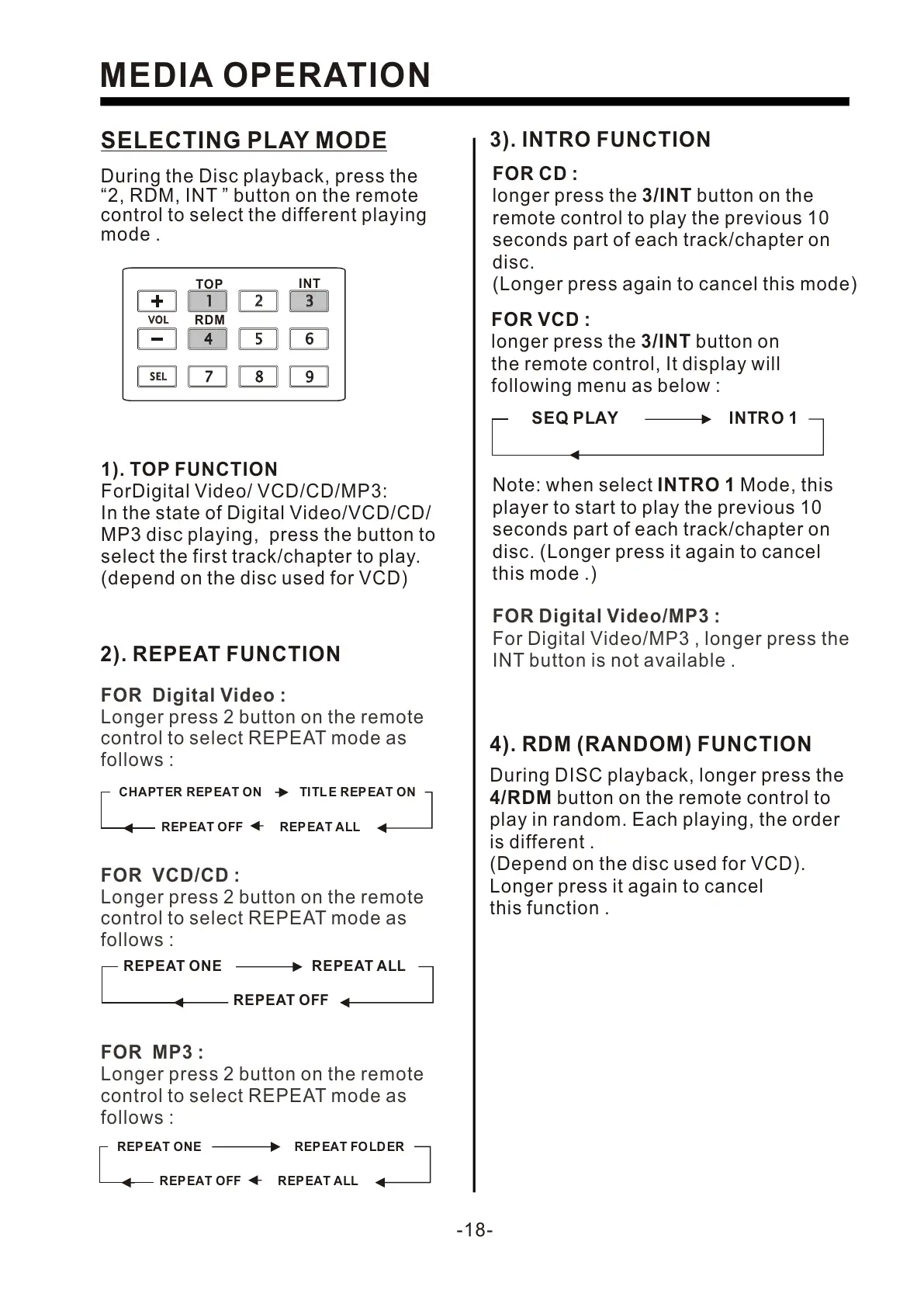
SELECTING PLAY MODE
During the Disc playback, press the
“2, RDM, INT ” button on the remote
control to select the different playing
mode .
2). REPEAT FUNCTION
REPEAT OFF
REPEAT ONE REPEAT ALL
FOR VCD/CD :
Longer press 2 button on the remote
control to select REPEAT mode as
follows :
FOR Digital Video :
Longer press 2 button on the remote
control to select REPEAT mode as
follows :
REPEAT ALL
CHAPT ER REPEAT ON TI TLE REP EAT ON
REPEAT OFF
-18-
MEDIA OPERATION
11
22
33
44
55 66
77
88
99
SELSEL
VOLVOL
TOP
INT
RDM
1). TOP FUNCTION
ForDigital Video/ VCD/CD/MP3:
In the state of Digital Video/VCD/CD/
MP3 disc playing, press the button to
select the first track/chapter to play.
(depend on the disc used for VCD)
3). INTRO FUNCTION
FOR CD :
longer press the 3/INT button on the
remote control to play the previous 10
seconds part of each track/chapter on
disc.
(Longer press again to cancel this mode)
FOR VCD :
longer press the 3/INT button on
the remote control, It display will
following menu as below :
SEQ PLAY INTR O 1
Note: when select INTRO 1 Mode, this
player to start to play the previous 10
seconds part of each track/chapter on
disc. (Longer press it again to cancel
this mode .)
FOR Digital Video/MP3 :
For Digital Video/MP3 , longer press the
INT button is not available .
4). RDM (RANDOM) FUNCTION
During DISC playback, longer press the
4/RDM button on the remote control to
play in random. Each playing, the order
is different .
(Depend on the disc used for VCD).
Longer press it again to cancel
this function .
REPEAT ALL
REPEAT ONE REP EAT FOLD ER
REPEAT OFF
FOR MP3 :
Longer press 2 button on the remote
control to select REPEAT mode as
follows :


 To Next Page
 Loading...