MP3/WMA/JPEG/MPEG4 PLAY
-31-
MP3/MP4 OPERATION
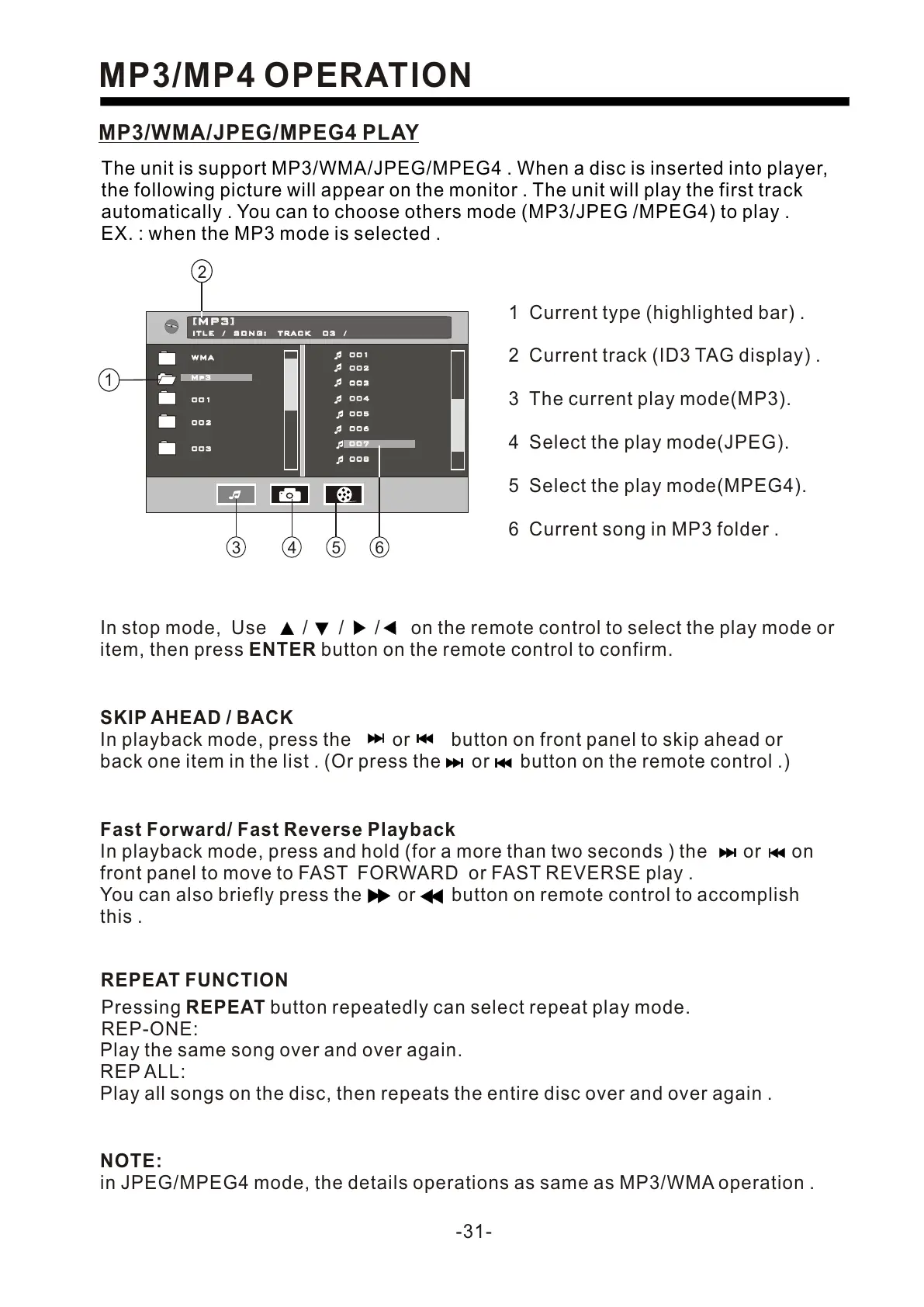
The unit is support MP3/WMA/JPEG/MPEG4 . When a disc is inserted into player,
the following picture will appear on the monitor . The unit will play the first track
automatically . You can to choose others mode (MP3/JPEG /MPEG4) to play .
EX. : when the MP3 mode is selected .
In stop mode, Use / / / on the remote control to select the play mode or
item, then press ENTER button on the remote control to confirm.
NOTE:
in JPEG/MPEG4 mode, the details operations as same as MP3/WMA operation .
1 Current type (highlighted bar) .
2 Current track (ID3 TAG display) .
3 The current play mode(MP3).
4 Select the play mode(JPEG).
5 Select the play mode(MPEG4).
6 Current song in MP3 folder .
WMAWMA
Mp3Mp3
[M P 3 ][M P 3 ]
ITLE / SONG: TRACK 03 / ITLE / SONG: TRACK 03 /
001001
002002
003003
004004
005005
006006
007007
008008
007007
001001
002002
003003
3 4 5 6
2
1
SKIP AHEAD / BACK
In playback mode, press the or button on front panel to skip ahead or
back one item in the list . (Or press the or button on the remote control .)
Fast Forward/ Fast Reverse Playback
In playback mode, press and hold (for a more than two seconds ) the or on
front panel to move to FAST FORWARD or FAST REVERSE play .
You can also briefly press the or button on remote control to accomplish
this .
REPEAT FUNCTION
Pressing REPEAT button repeatedly can select repeat play mode.
REP-ONE:
Play the same song over and over again.
REP ALL:
Play all songs on the disc, then repeats the entire disc over and over again .


 To Next Page
 Loading...