OPERATION
Radio Operation
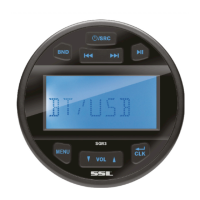
Press the SRC button to select radio mode. Then press BND button to select desired band.
Short press / to select the desired radio station. Press and hold / to
manually tune the frequency.
Auto Store:
Press the BND button for 2 seconds to auto store stations to bands 1~3.
Manually store station
Select a desired station, Short press the MENU button 2 times. It will display “SAVE P1”.,
Press VOL+/- buttons to select P1~P6, then press CLK to save the station.
Listening to Preset Stations
In the RADIO band. Press the MENU button. It will show “PRE 87.5”. Press VOL+/- buttons
to select P1~P6.
USB Operation
When an USB flash drive is inserted to the unit, the unit will play the MP3/WMA file
automatically. If a USB flash drive is already inserted in the unit, short press the SRC button
until the USB source appears on the display.
Select a File
Press / to skip to next/previous files. Hold / to fast forward or fast
reverse.
Play/Pause
Press button to pause/play the file.
Repeat function
When playing MP3/WMA, Press the MENU button, it will show ”RPT ALL”, Then press
VOL+/- button to select RPT ONE/RPT FOLD/ RPT ALL.
Random function
When playing MP3/WMA, Press the MENU button 2 times, it will show “RDM ON”. Press
VOL+/- button to select between RDM ON/OFF.
DIR+/- function
When playing MP3/WMA, Press the BND button, it will show “DIR SCH”, press VOL+/-
buttons to select 1’st song of the upward/downward folder.
Search song
When playing MP3/WMA, Press the BND button 2 times, it will show “NUM ****”, press
VOL+/- buttons to enter the numbers, then press the CLK button to play. (Note: after one
number is entered, you will need to wait 3 seconds to enter the next number.)
AUX IN operation
Connect a male RCA to 3.5mm AUX in cable to the RCA AUX inputs on the rear of the unit.
Then press SRC button to switch to AUX IN mode.


 To Next Page
 Loading...